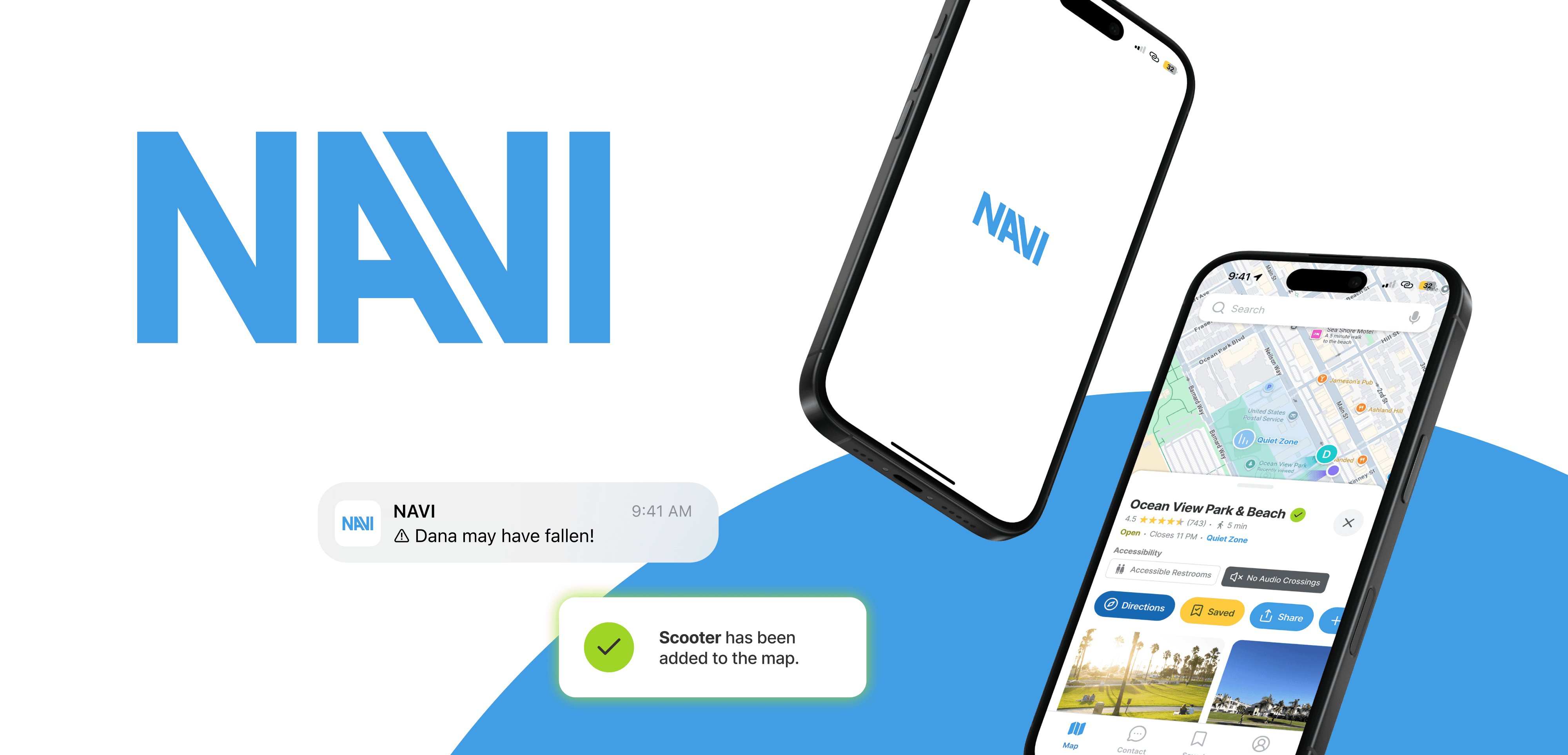
navi
An app and wearable mobility system for visually impaired users and their caretakers.
Product Design
•
UX/UI
•
Mobile Design
navi
An app and wearable mobility system for visually impaired users and their caretakers.
Product Design
•
UX/UI
•
Mobile Design
navi
An app and wearable mobility system for visually impaired users and their caretakers.
Product Design
•
UX/UI
•
Mobile Design
Project Brief
NAVI was developed in response to a class brief to design a site-specific solution for a mobility challenge in Los Angeles. Our team focused on Santa Monica’s Ocean View Park and surrounding beach areas, where open, unpredictable environments create unique barriers for visually impaired (VI) individuals and their caretakers. The requirement for a screen-based design inspired us to shift toward a caretaker-centered companion app paired with a conceptual AI navigation wearable. This approach reframed accessibility as a collaborative system rather than a solo experience and became a core strength of the project.
Project Type
Academic (Santa Monica College, IxD)
Role
Product Designer (Design Lead)
Timeline
Fall 2025 (16 weeks)
Team
Tyler Lin (Me), Maple Groves, Sandi Piorek, Sunni Monday, Therese Rodriguez
Project Brief
NAVI was developed in response to a class brief to design a site-specific solution for a mobility challenge in Los Angeles. Our team focused on Santa Monica’s Ocean View Park and surrounding beach areas, where open, unpredictable environments create unique barriers for visually impaired (VI) individuals and their caretakers. The requirement for a screen-based design inspired us to shift toward a caretaker-centered companion app paired with a conceptual AI navigation wearable. This approach reframed accessibility as a collaborative system rather than a solo experience and became a core strength of the project.
Project Type
Academic (Santa Monica College, IxD)
Role
Product Designer (Design Lead)
Timeline
Fall 2025 (16 weeks)
Team
Tyler Lin (Me), Maple Groves, Sandi Piorek, Sunni Monday, Therese Rodriguez
Project Brief
NAVI was developed in response to a class brief to design a site-specific solution for a mobility challenge in Los Angeles. Our team focused on Santa Monica’s Ocean View Park and surrounding beach areas, where open, unpredictable environments create unique barriers for visually impaired (VI) individuals and their caretakers. The requirement for a screen-based design inspired us to shift toward a caretaker-centered companion app paired with a conceptual AI navigation wearable. This approach reframed accessibility as a collaborative system rather than a solo experience and became a core strength of the project.
Project Type
Academic (Santa Monica College, IxD)
Role
Product Designer (Design Lead)
Timeline
Fall 2025 (16 weeks)
Team
Tyler Lin (Me), Maple Groves, Sandi Piorek, Sunni Monday, Therese Rodriguez
Problem
Even in walkable urban areas like Santa Monica, visually impaired (VI) individuals and their caretakers face unsafe, stressful navigation due to unpredictable obstacles, sensory overload, and a lack of tools that support shared mobility.
Insights
Caretakers, who play a central role in VI mobility, are largely overlooked in existing assistive technologies. Interviews showed they experience high mental and emotional load and need support for advance planning, shared awareness, and moments of independence.
Solution
NAVI is a two-part mobility system combining a conceptual AI navigation wearable for VI users with a caretaker-facing app that supports route planning, real-time awareness, communication, and safer independence.
Outcome
We designed a scenario-based caretaker app prototype to communicate the system in context and conducted usability testing with real caretakers, who reported reduced anxiety, increased confidence, and a strong interest in using the product.
NAVI was also presented to BMW Designworks, where design leads described it as a compelling, future-looking, and marketable application of AI grounded in real human needs—distinct from existing novelty wearables.
Problem
Even in walkable urban areas like Santa Monica, visually impaired (VI) individuals and their caretakers face unsafe, stressful navigation due to unpredictable obstacles, sensory overload, and a lack of tools that support shared mobility.
Insights
Caretakers, who play a central role in VI mobility, are largely overlooked in existing assistive technologies. Interviews showed they experience high mental and emotional load and need support for advance planning, shared awareness, and moments of independence.
Solution
NAVI is a two-part mobility system combining a conceptual AI navigation wearable for VI users with a caretaker-facing app that supports route planning, real-time awareness, communication, and safer independence.
Outcome
We designed a scenario-based caretaker app prototype to communicate the system in context and conducted usability testing with real caretakers, who reported reduced anxiety, increased confidence, and a strong interest in using the product.
NAVI was also presented to BMW Designworks, where design leads described it as a compelling, future-looking, and marketable application of AI grounded in real human needs—distinct from existing novelty wearables.
Problem
Even in walkable urban areas like Santa Monica, visually impaired (VI) individuals and their caretakers face unsafe, stressful navigation due to unpredictable obstacles, sensory overload, and a lack of tools that support shared mobility.
Insights
Caretakers, who play a central role in VI mobility, are largely overlooked in existing assistive technologies. Interviews showed they experience high mental and emotional load and need support for advance planning, shared awareness, and moments of independence.
Solution
NAVI is a two-part mobility system combining a conceptual AI navigation wearable for VI users with a caretaker-facing app that supports route planning, real-time awareness, communication, and safer independence.
Outcome
We designed a scenario-based caretaker app prototype to communicate the system in context and conducted usability testing with real caretakers, who reported reduced anxiety, increased confidence, and a strong interest in using the product.
NAVI was also presented to BMW Designworks, where design leads described it as a compelling, future-looking, and marketable application of AI grounded in real human needs—distinct from existing novelty wearables.
Research
Fieldwork Observations
Santa Monica: Designed for sighted convenience, not visually impaired safety.
Fieldwork Observations
Santa Monica: Designed for sighted convenience, not visually impaired safety.
Fieldwork Observations
Santa Monica: Designed for sighted convenience, not visually impaired safety.
We conducted site observations at Santa Monica’s Main Street, Ocean View Park, and the nearby beach area to understand mobility and accessibility challenges. Sidewalks, ramps, and bike paths were generally well-maintained, and most sighted visitors reported very few mobility issues within Santa Monica. However, we identified potential obstacles for VI users, including obstructing restaurant signage, rental scooters and bikes blocking pathways, crossings without sound signals, and the chaotic bike path with no formal crossing indications.
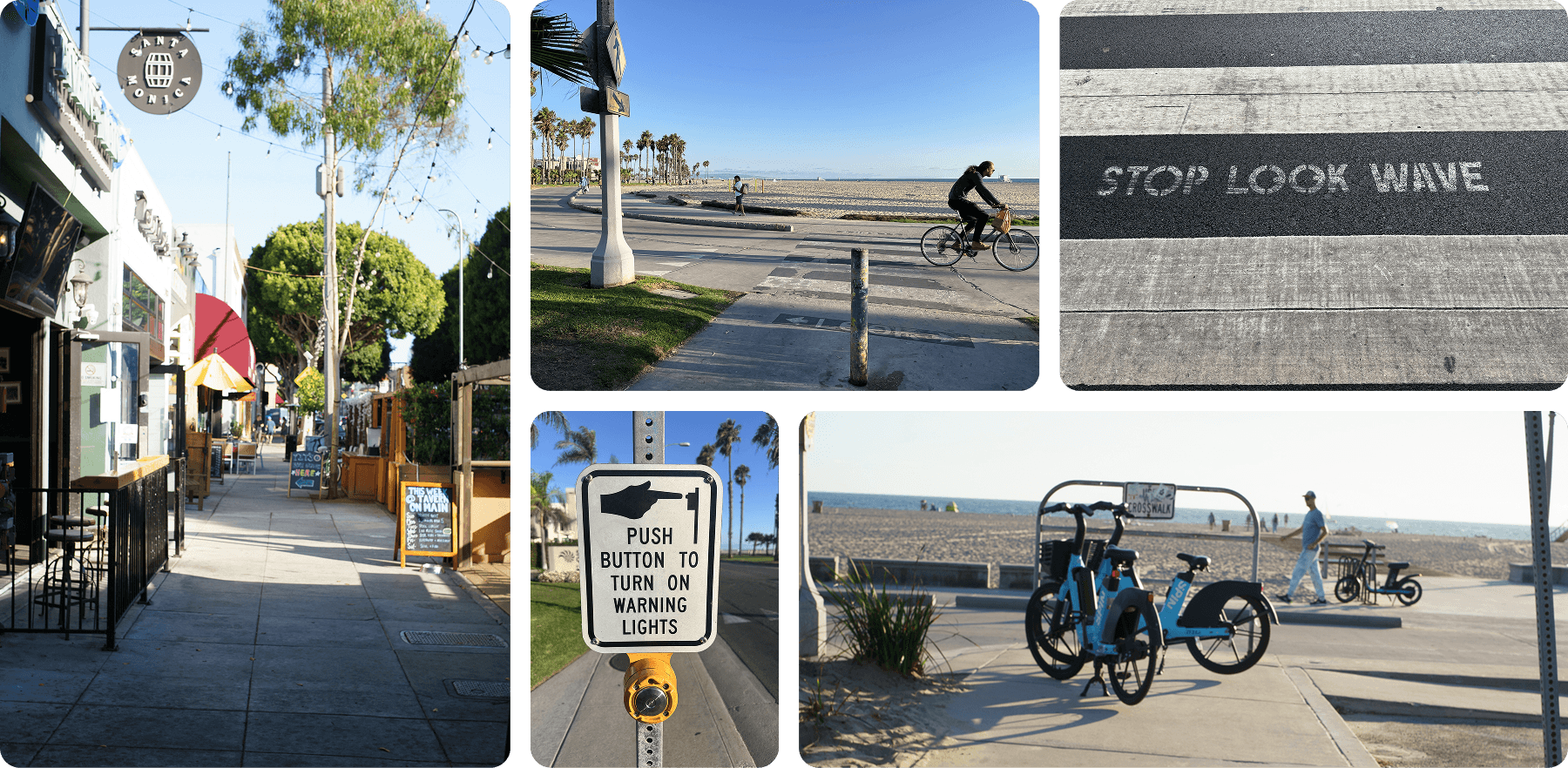
Fieldwork photos: Santa Monica’s Main Street with obstructing signage, beach bike path with no crossing signals, rental bikes blocking walkways, and a crosswalk marked only with “STOP LOOK WAVE”
Fieldwork photos: Santa Monica’s Main Street with obstructing signage, beach bike path with no crossing signals, rental bikes blocking walkways, and a crosswalk marked only with “STOP LOOK WAVE”
Fieldwork photos: Santa Monica’s Main Street with obstructing signage, beach bike path with no crossing signals, rental bikes blocking walkways, and a crosswalk marked only with “STOP LOOK WAVE”
Desktop Research
Caretakers play a crucial role in VI users’ daily lives but face high burnout and are unsupported by existing tech.
Desktop Research
Caretakers play a crucial role in VI users’ daily lives but face high burnout and are unsupported by existing tech.
Desktop Research
Caretakers play a crucial role in VI users’ daily lives but face high burnout and are unsupported by existing tech.
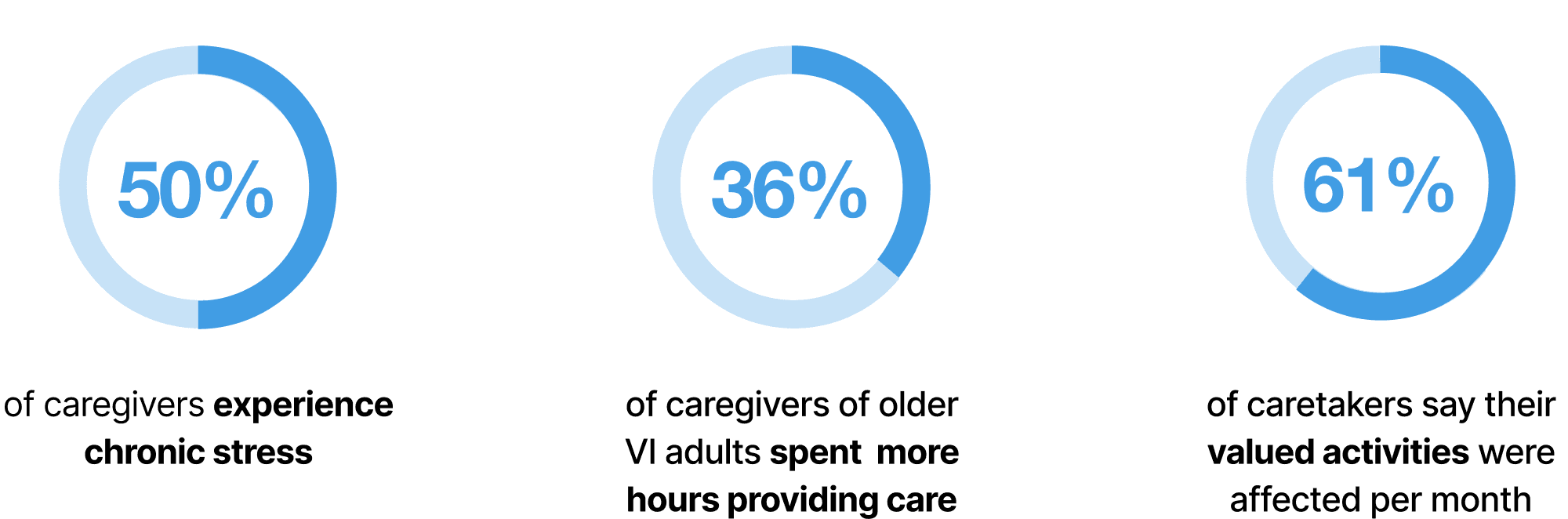
Visual impairment affects approximately 7 million people in the U.S., and numbers are rising with an aging population, which means the number of caretakers is also rising. Caretakers face high stress and burnout, as supporting VI loved ones involves significant physical and emotional assistance, while maintaining independence is crucial for both parties. Existing assistive technologies focus on VI users but rarely consider caretaker needs or shared systems.
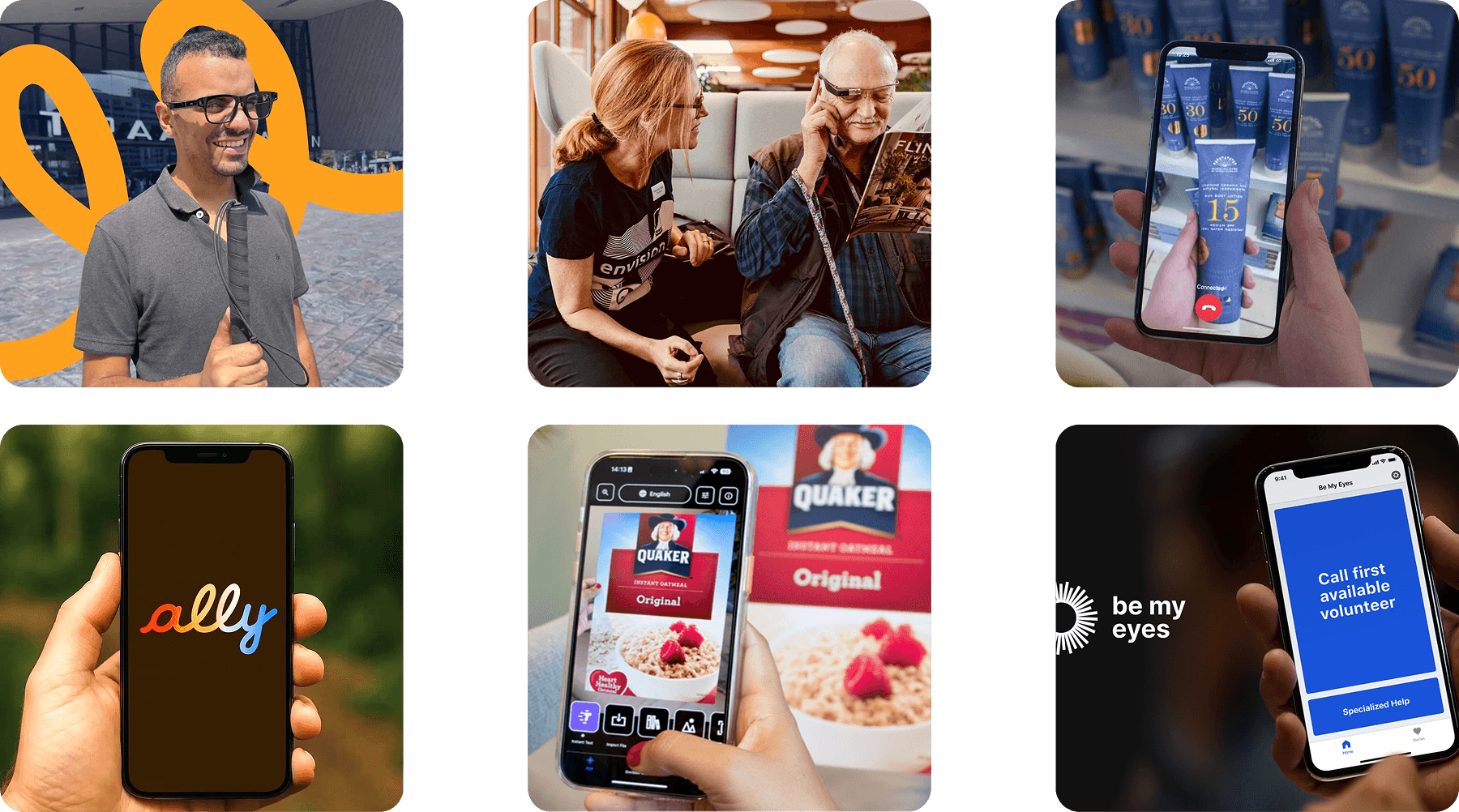
Existing VI assistive products: Ally App and Ally Solo Glasses, Envision Companion App and Glasses, Be My Eyes
Existing VI assistive products: Ally App and Ally Solo Glasses, Envision Companion App and Glasses, Be My Eyes
Existing VI assistive products: Ally App and Ally Solo Glasses, Envision Companion App and Glasses, Be My Eyes
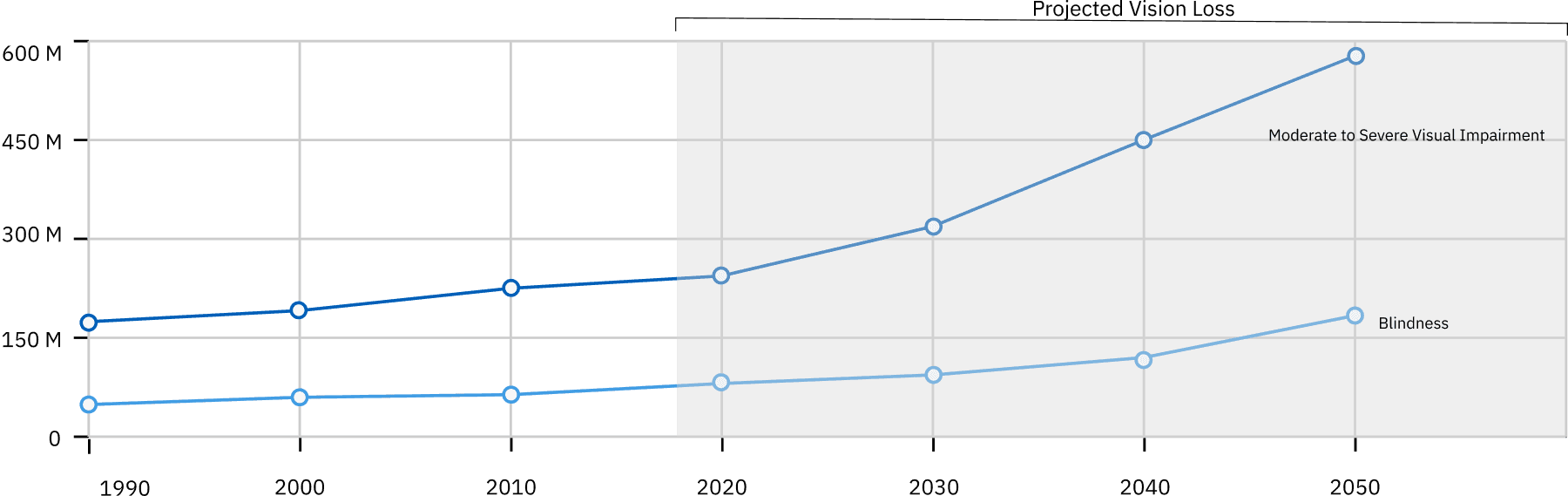
Global number of those affected by vision loss, all ages. Prevalence of vision loss highlights the scale and urgency of accessibility needs.
Global number of those affected by vision loss, all ages. Prevalence of vision loss highlights the scale and urgency of accessibility needs.
Global number of those affected by vision loss, all ages. Prevalence of vision loss highlights the scale and urgency of accessibility needs.
Interviews
Effective mobility for VI users depends on caretakers, environmental cues, preparation, and discreet, socially-integrated support.
Interviews
Effective mobility for VI users depends on caretakers, environmental cues, preparation, and discreet, socially-integrated support.
Interviews
Effective mobility for VI users depends on caretakers, environmental cues, preparation, and discreet, socially-integrated support.
Interviews revealed that VI users often experience progressive, partial vision loss and rely on light, contrast, and tactile cues to navigate safely, while crowded or noisy environments create sensory overload and increase the risk of collisions with unexpected obstacles. Users frequently depend on caretakers for real-time guidance and reassurance, making shared mobility essential, yet social inclusion is equally important—tools that interrupt conversation or draw attention can feel isolating. While some assistive technologies can help with specific tasks, no comprehensive system exists. Planning, route familiarity, and repetition are critical strategies for maintaining independence and reducing stress for both users and caretakers.

“For me, sunsets are about connecting with people. The energy is nice, the ocean air, and enjoying a Starbucks coffee. I still want to do things and be part of the community.”
Steve
Athlete with Macular Degeneration
“For me, sunsets are about connecting with people. The energy is nice, the ocean air, and enjoying a Starbucks coffee. I still want to do things and be part of the community.”
Steve
Athlete with Macular Degeneration
“For me, sunsets are about connecting with people. The energy is nice, the ocean air, and enjoying a Starbucks coffee. I still want to do things and be part of the community.”
Steve
Athlete with Macular Degeneration

“The world is not built for blind people.”
Kacey
Wife & Caretaker of Steve
“The world is not built for blind people.”
Kacey
Wife & Caretaker of Steve
“The world is not built for blind people.”
Kacey
Wife & Caretaker of Steve

“As my mom aged, she became increasingly dependent on me, even to places we’d been a million times before. I’d have to tell her every direction to take, every single time we went.”
Cheryl
Caretaker of her aging VI mother
“As my mom aged, she became increasingly dependent on me, even to places we’d been a million times before. I’d have to tell her every direction to take, every single time we went.”
Cheryl
Caretaker of her aging VI mother
“As my mom aged, she became increasingly dependent on me, even to places we’d been a million times before. I’d have to tell her every direction to take, every single time we went.”
Cheryl
Caretaker of her aging VI mother
Prototyping
Initial Story & Concept Sketches
Initial Story & Concept Sketches
Initial Story & Concept Sketches
Our initial storyboard followed a visually impaired user and his caretaker through a day at Santa Monica’s Main Street, Ocean View Park, and the beach. The story helped us explore real-world moments such as crossing streets without sound signals, navigating dark restrooms, moving through crowded paths, and balancing independence with safety. At this stage, the concept focused primarily on the AI navigation wearable, supported by wristbands and a caretaker companion app.
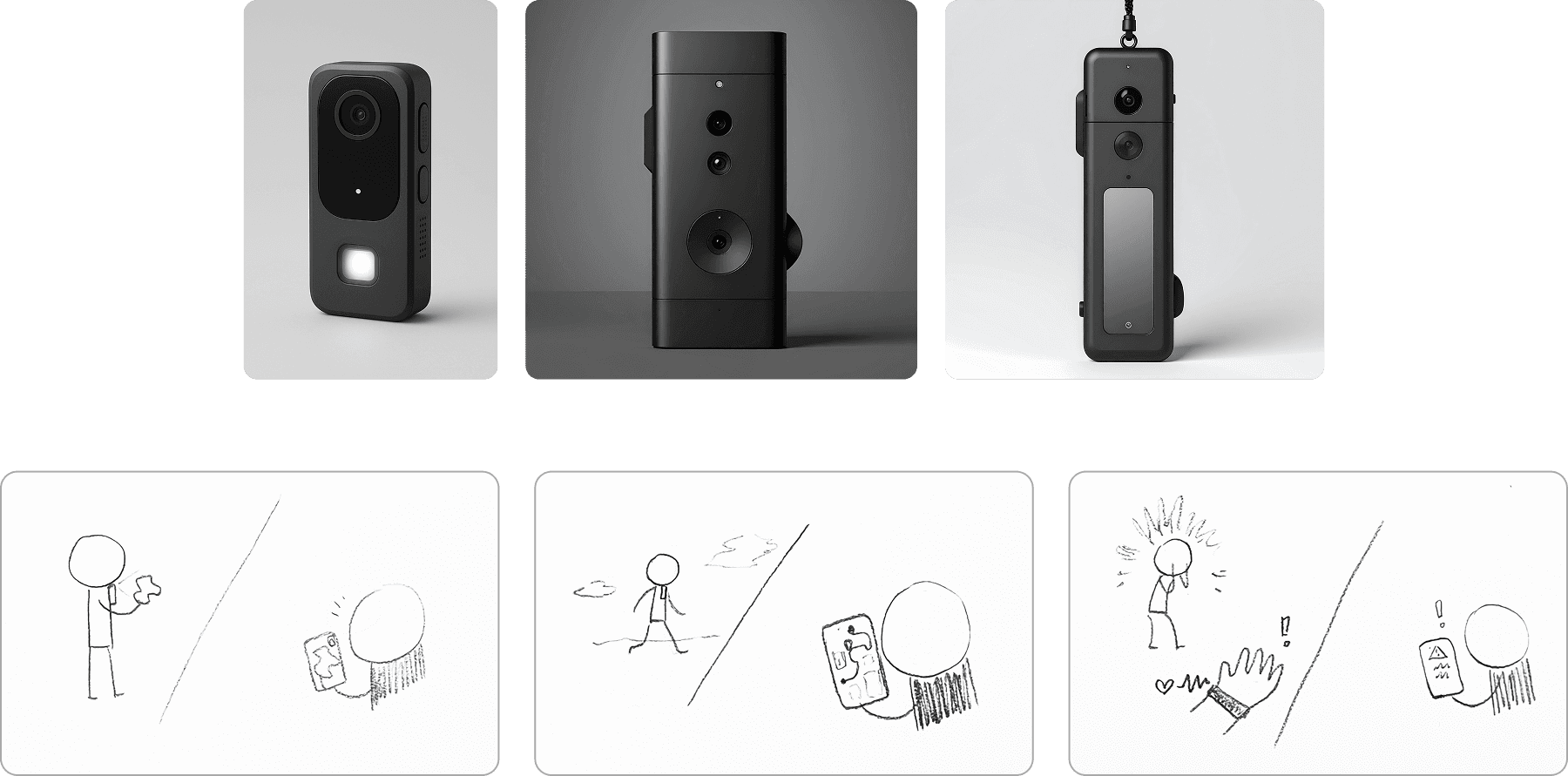
Early AI-generated mockups and hand-drawn sketches of the wearable and app concept.
Early AI-generated mockups and hand-drawn sketches of the wearable and app concept.
Early AI-generated mockups and hand-drawn sketches of the wearable and app concept.
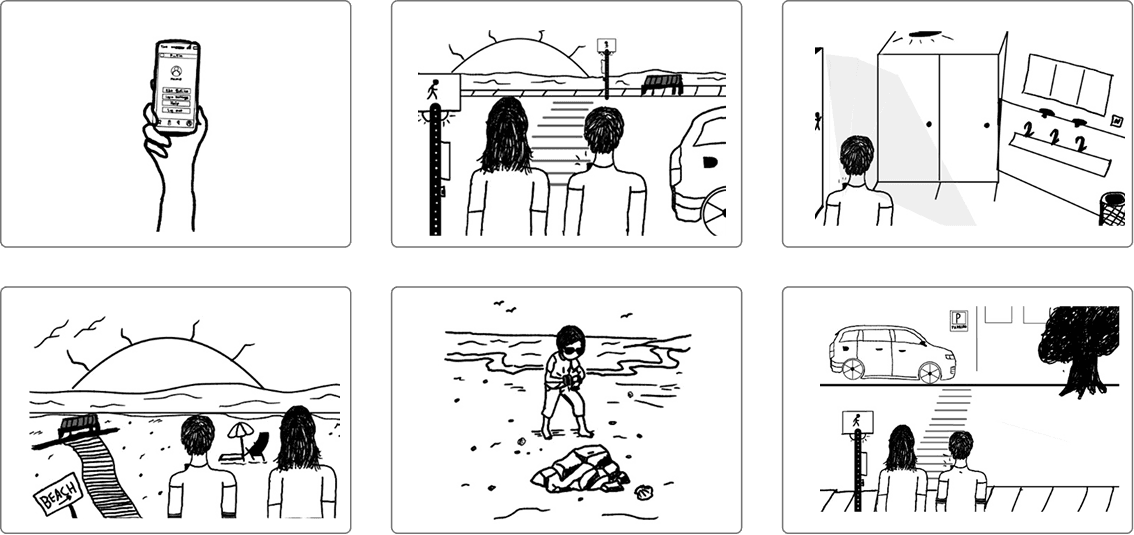
Early storyboard showing the VI user's trip with his caretaker to the Santa Monica beach. Illustrations by Sunni Monday.
Early storyboard showing the VI user's trip with his caretaker to the Santa Monica beach. Illustrations by Sunni Monday.
Early storyboard showing the VI user's trip with his caretaker to the Santa Monica beach. Illustrations by Sunni Monday.
Story Development & Screen Flow Mapping
Story Development & Screen Flow Mapping
Story Development & Screen Flow Mapping
To bring structure to our concept, we mapped each step of the user journey to specific functions for both the wearable and the caretaker app. This included text, audio, haptic feedback, screen visuals, and user actions. The mapping helped clarify what each part of the system should do, preventing overlap and confusion between the wearable and the app.
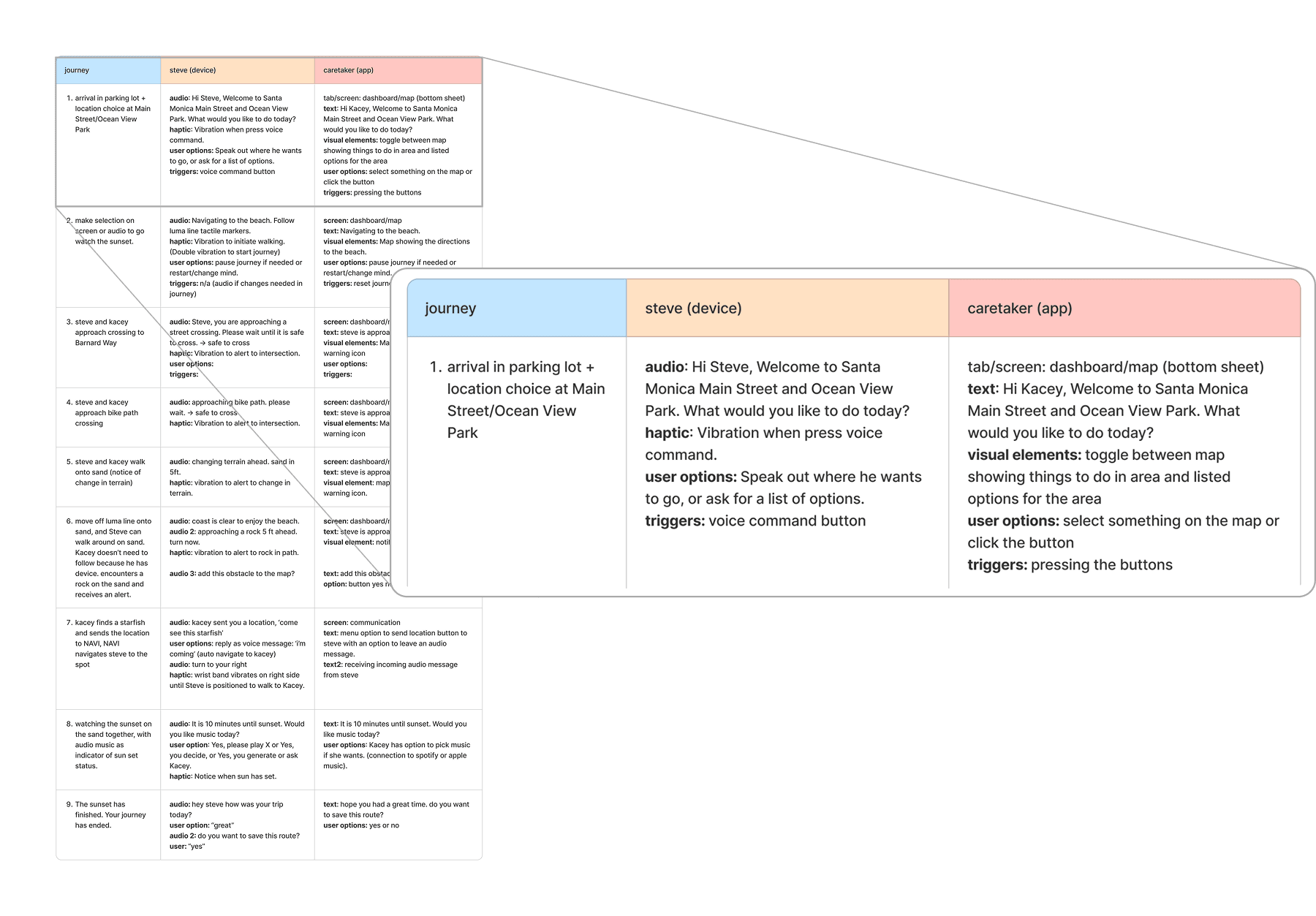
Table mapping story steps to wearable and app features, audio/haptic cues, visuals, and user actions.
Table mapping story steps to wearable and app features, audio/haptic cues, visuals, and user actions.
Table mapping story steps to wearable and app features, audio/haptic cues, visuals, and user actions.
Lo-fi & Mid-fi Prototype
Lo-fi & Mid-fi Prototype
Lo-fi & Mid-fi Prototype
The lo-fi prototype focused on testing the end-to-end caretaker journey from selecting a destination to receiving obstacle, crossing, and safety alerts, allowing us to validate the core flow, pacing, and narrative of shared navigation. It helped reveal where users became confused, what needed to be explicit rather than implied, and which moments were essential for understanding the system.
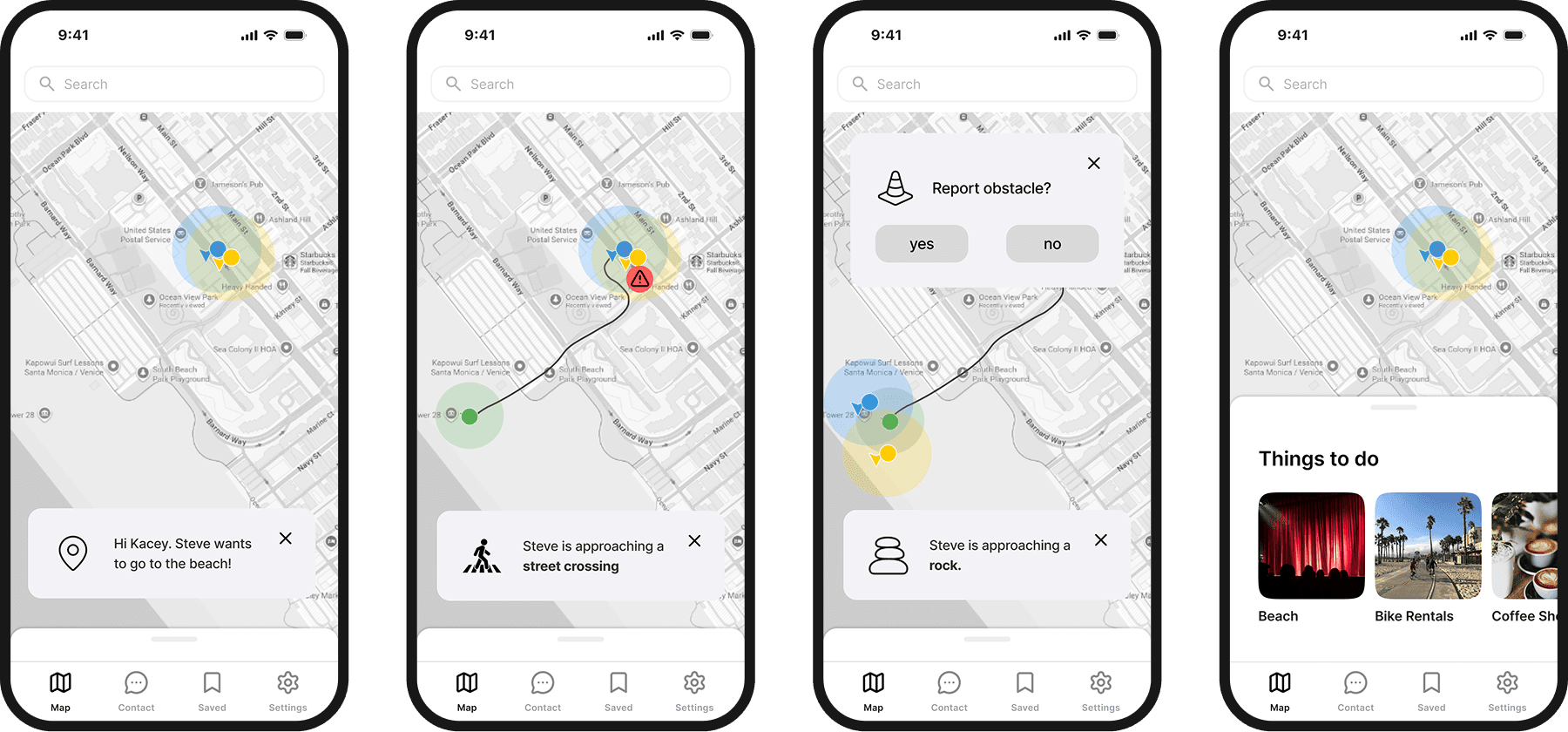
Select lo-fi screens: Destination selection, crossing and obstacle alerts, and recommended activities.
Select lo-fi screens: Destination selection, crossing and obstacle alerts, and recommended activities.
Select lo-fi screens: Destination selection, crossing and obstacle alerts, and recommended activities.
The mid-fi prototype added clarity and confidence through features like navigation bottom-sheets, improved alerts and notifications, quick map actions, and saved trips. The visual improvements were slight, as the focus remained on functionality.
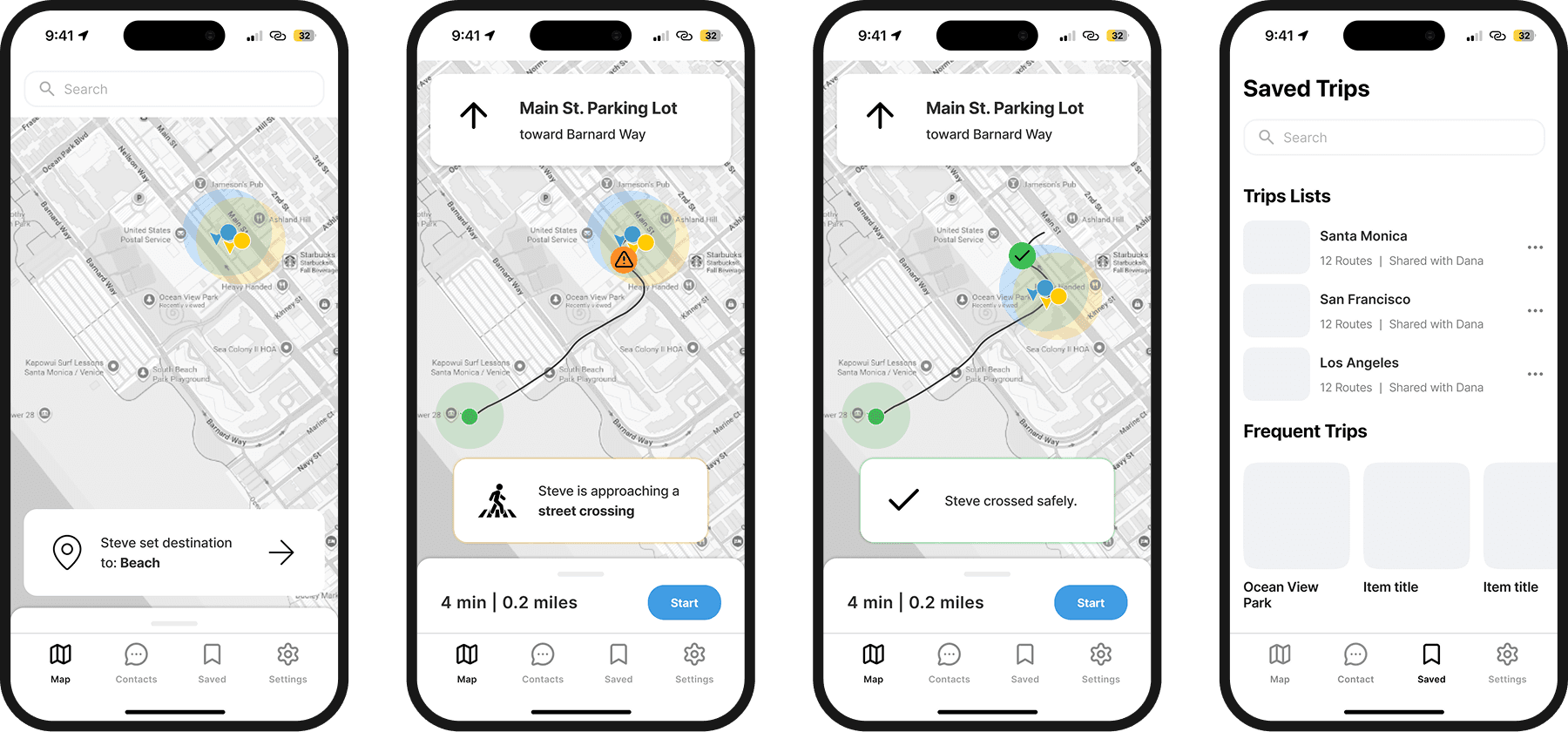
Select mid-fi screens: Destination selection, crossing alert, “crossed safely” notification, saved trips
Select mid-fi screens: Destination selection, crossing alert, “crossed safely” notification, saved trips
Select mid-fi screens: Destination selection, crossing alert, “crossed safely” notification, saved trips
User Testing & Iterations
User Testing & Iterations
User Testing & Iterations
In the early stages, we conducted several rounds of internal user testing with classmates and the professor. Simulating both the wearable and caretaker app was very confusing, and feedback often focused on the testing setup and script rather than the app itself. Eventually, we shifted to focusing solely on prototyping and testing the caretaker app.
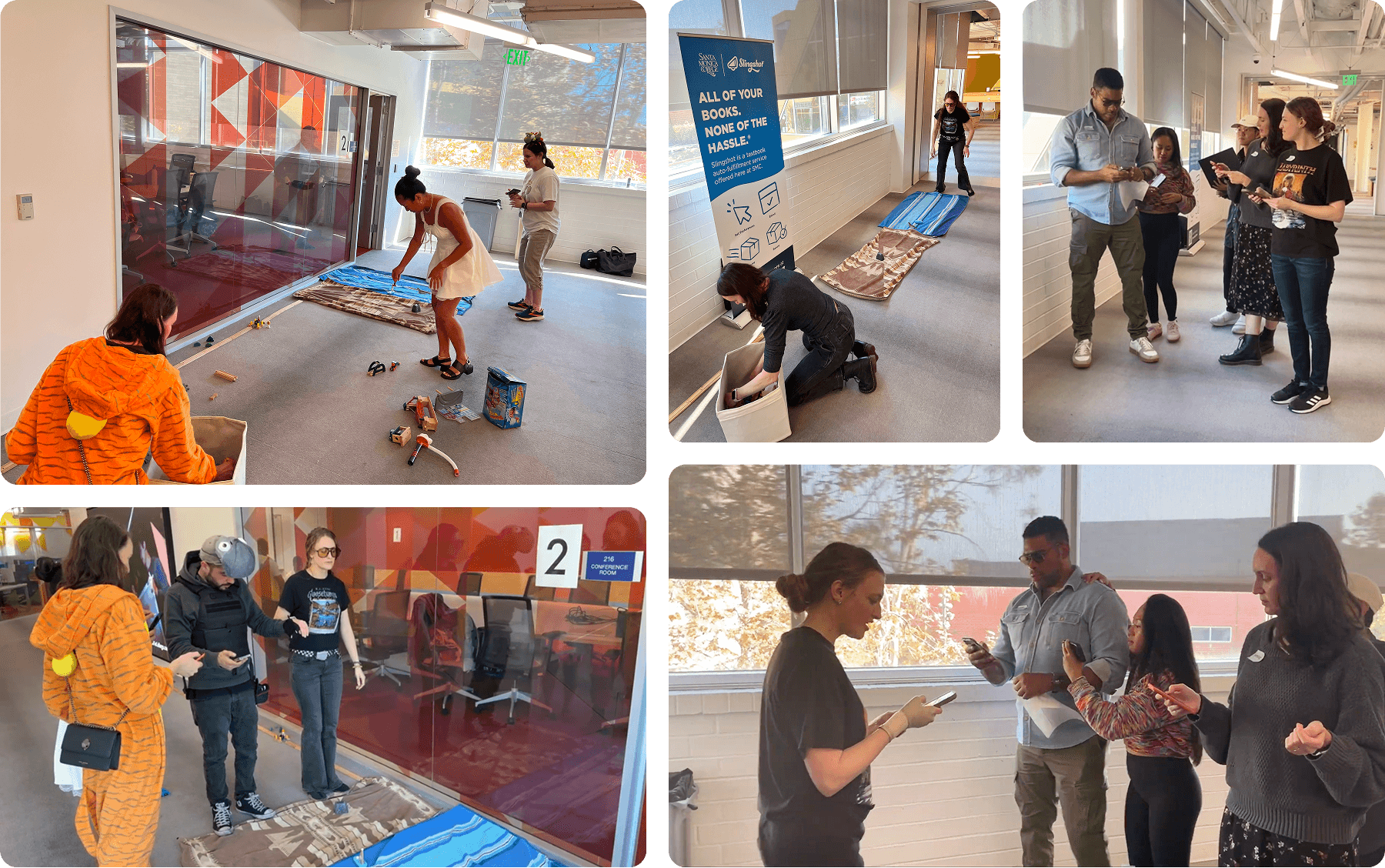
Early testing took the entire team to simulate the wearable, app, and environment while narrating the story and roleplaying as the VI user.
Early testing took the entire team to simulate the wearable, app, and environment while narrating the story and roleplaying as the VI user.
Early testing took the entire team to simulate the wearable, app, and environment while narrating the story and roleplaying as the VI user.
For the hi-fi prototype, we also tested with real caretakers, who found the NAVI app reduced mental load, increased confidence, and allowed greater freedom for both them and the VI user. In line with our research, they noted that they had never seen an app like this and were very glad to have the support. They all found the existing features very helpful but wanted to see more.
We expanded the prototype to better support real-world caregiving by adding community-vetted route previews, real-time tracking and follow mode, SOS and quick actions, and clearer navigation through refined visuals and focused trip tools. The narrative also evolved from simple short-distance navigation to higher-stakes scenarios on the beach, including dangerous obstacles and moments of independence, to demonstrate the follow mode and SOS features.
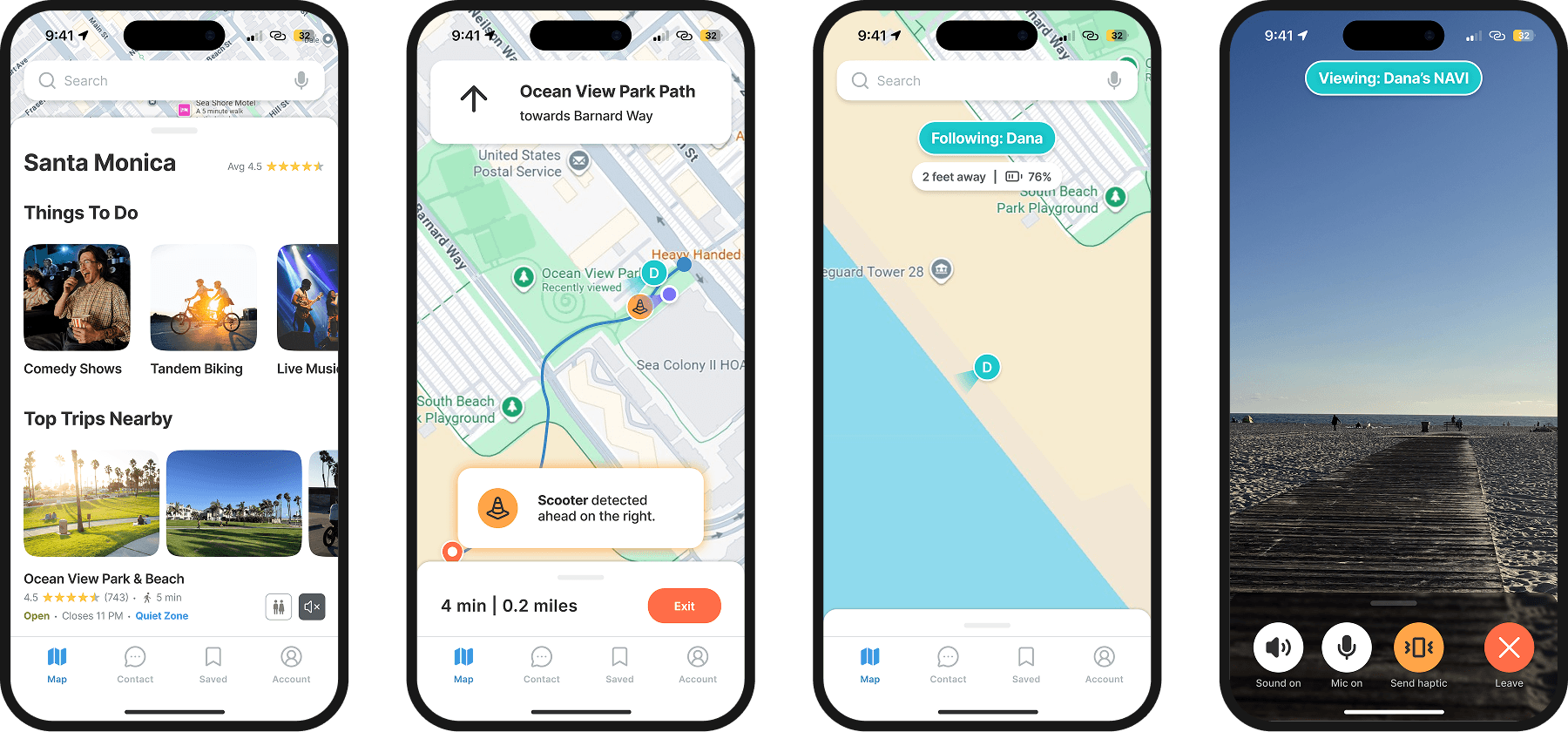
Upgraded visuals and added features based on feedback.
Upgraded visuals and added features based on feedback.
Upgraded visuals and added features based on feedback.
Final Storyboard
Final Storyboard
Final Storyboard
The storyboard follows Josh guiding his mother Dana, who has late-stage macular degeneration, through a day out. It shows the challenges of navigating crowded spaces and hazards, and how the NAVI app and device enable Dana’s independent exploration with community-vetted routes, real-time alerts, location tracking, and easy communication. The story highlights both user safety and caregiver freedom, while supporting shared experiences like the beach and a comedy show.
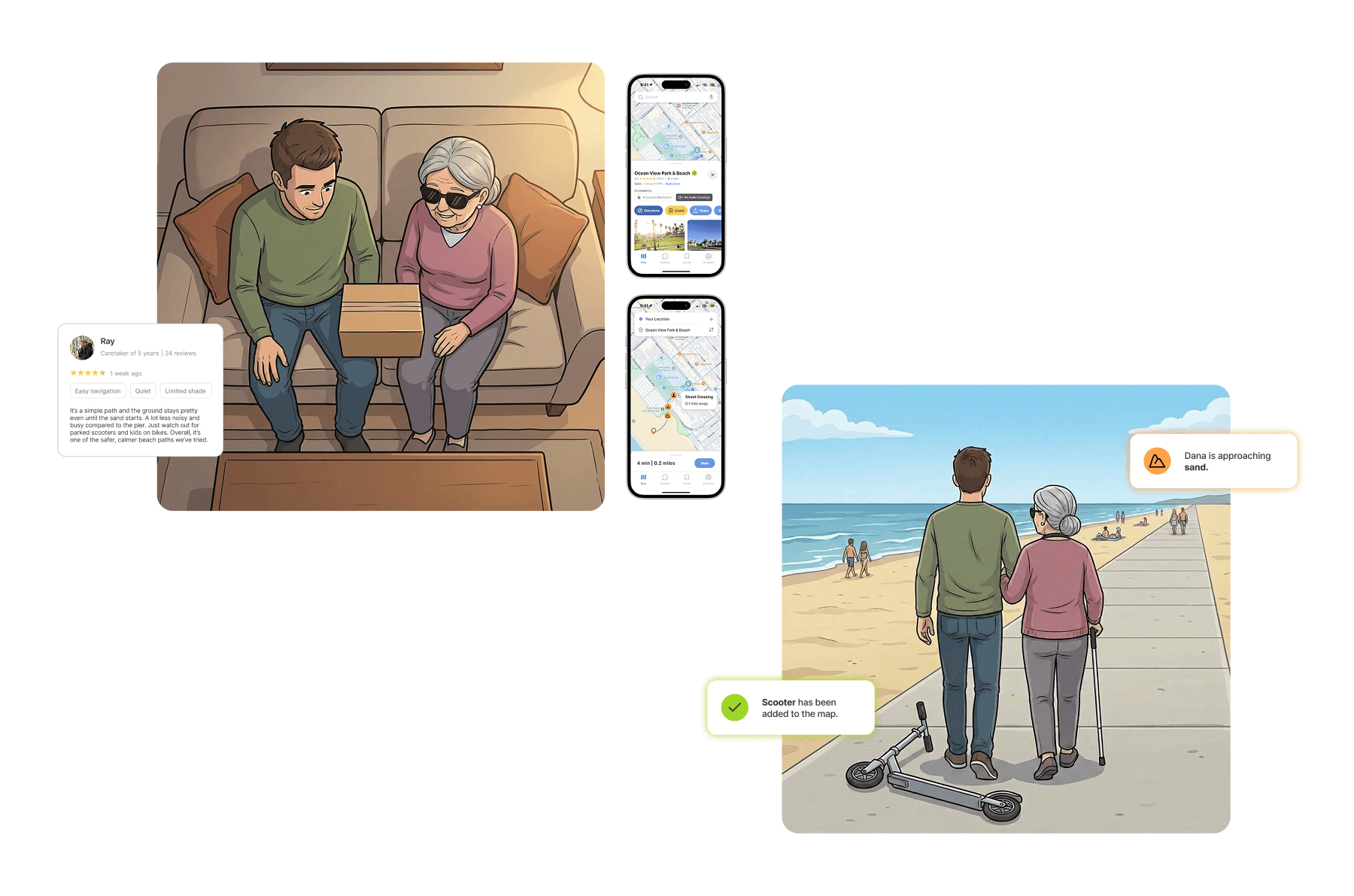
Josh uses the NAVI app to preview a quiet, community-vetted route with obstacle and busyness insights, then watches the wearable guide Dana in real time, alerting her to crossings and hazards before he has to.
Josh uses the NAVI app to preview a quiet, community-vetted route with obstacle and busyness insights, then watches the wearable guide Dana in real time, alerting her to crossings and hazards before he has to.
Josh uses the NAVI app to preview a quiet, community-vetted route with obstacle and busyness insights, then watches the wearable guide Dana in real time, alerting her to crossings and hazards before he has to.
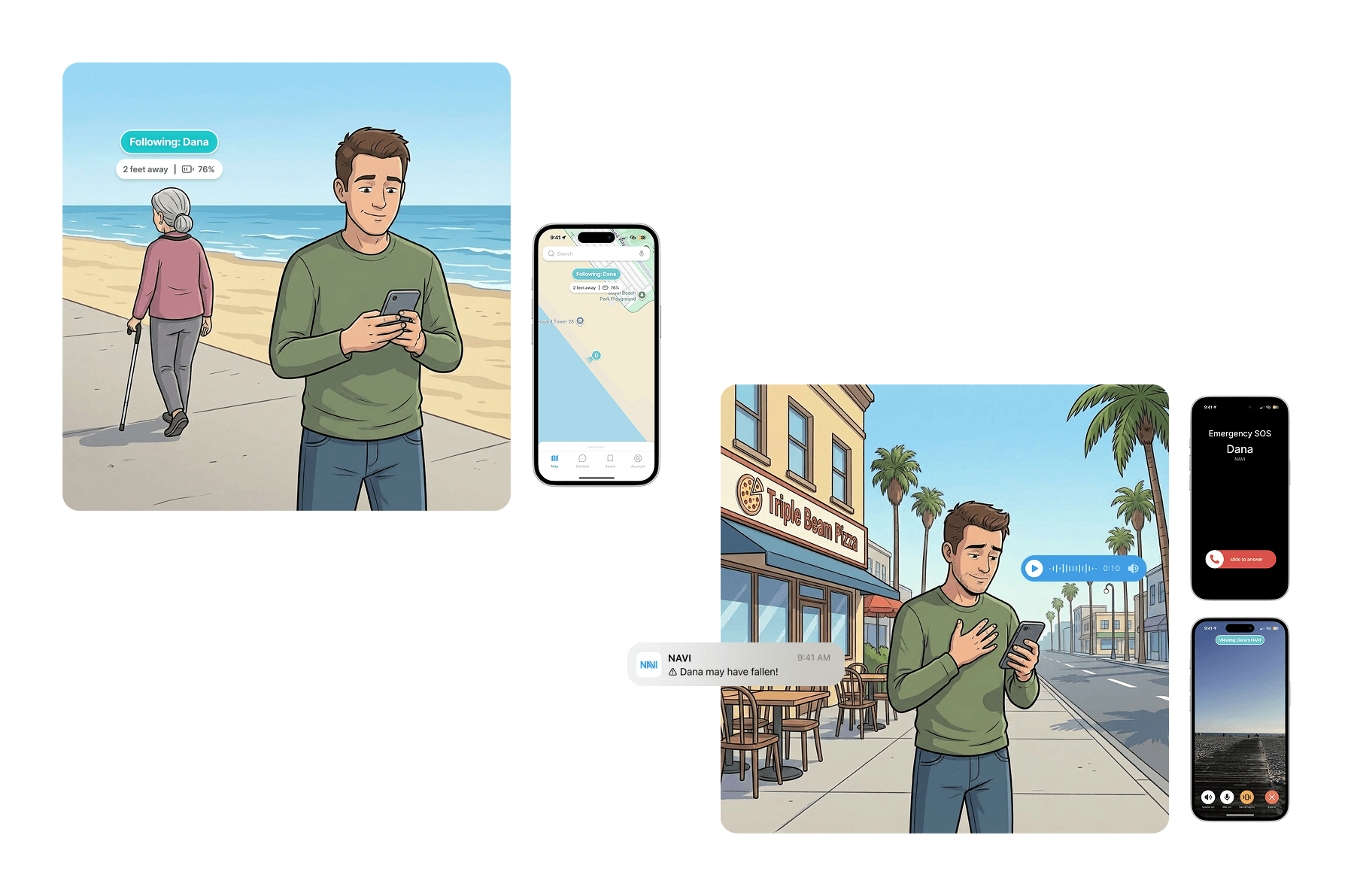
At the beach, Josh confidently steps away while tracking Dana’s location. When a fall alert triggers, he’s able to check in and communicate instantly, staying connected without constant supervision.
At the beach, Josh confidently steps away while tracking Dana’s location. When a fall alert triggers, he’s able to check in and communicate instantly, staying connected without constant supervision.
At the beach, Josh confidently steps away while tracking Dana’s location. When a fall alert triggers, he’s able to check in and communicate instantly, staying connected without constant supervision.
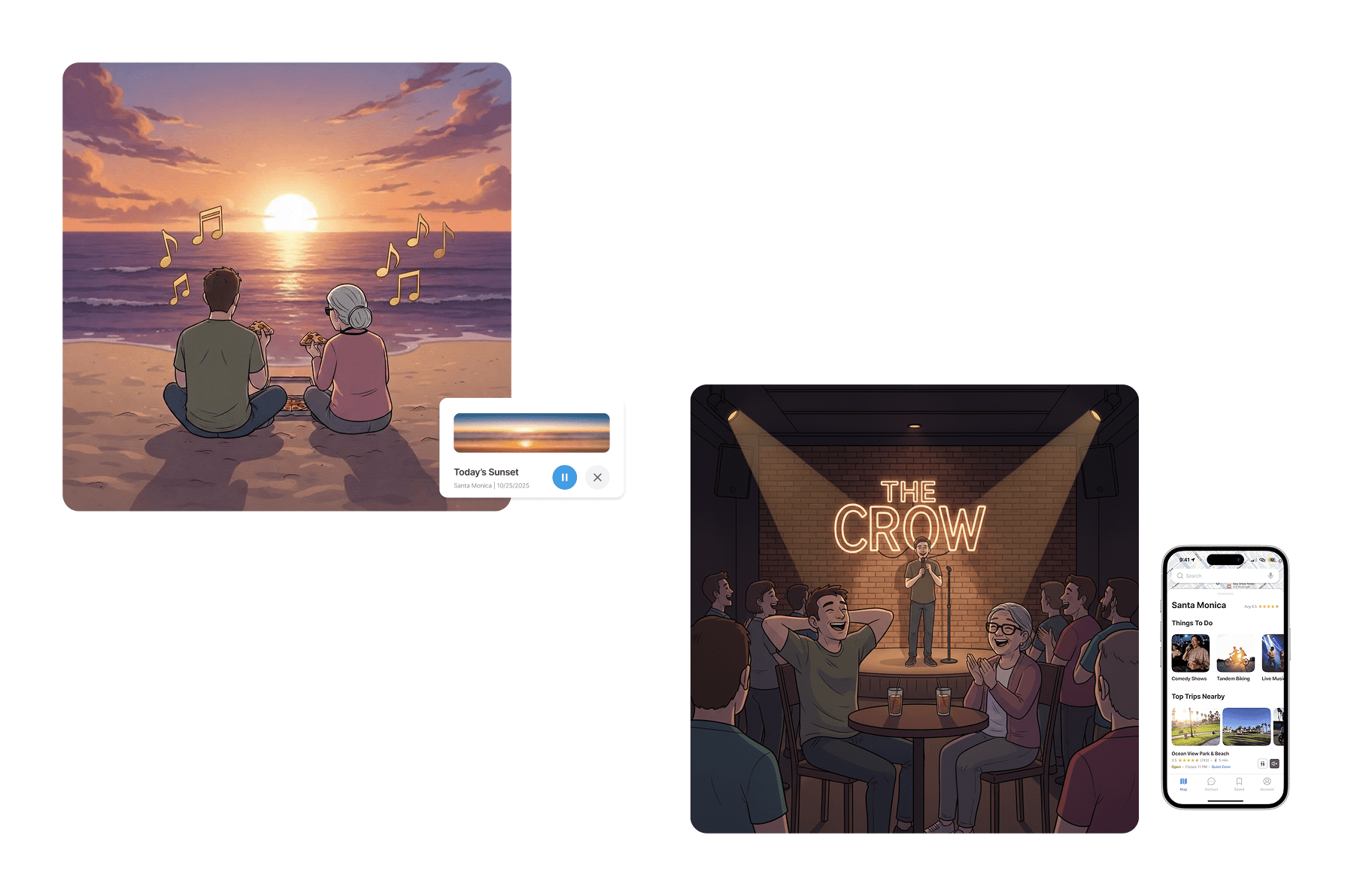
NAVI enhances the sunset with uniquely generated music, then helps Josh discover nearby VI-friendly activities. They both enjoy a night of comedy.
NAVI enhances the sunset with uniquely generated music, then helps Josh discover nearby VI-friendly activities. They both enjoy a night of comedy.
NAVI enhances the sunset with uniquely generated music, then helps Josh discover nearby VI-friendly activities. They both enjoy a night of comedy.
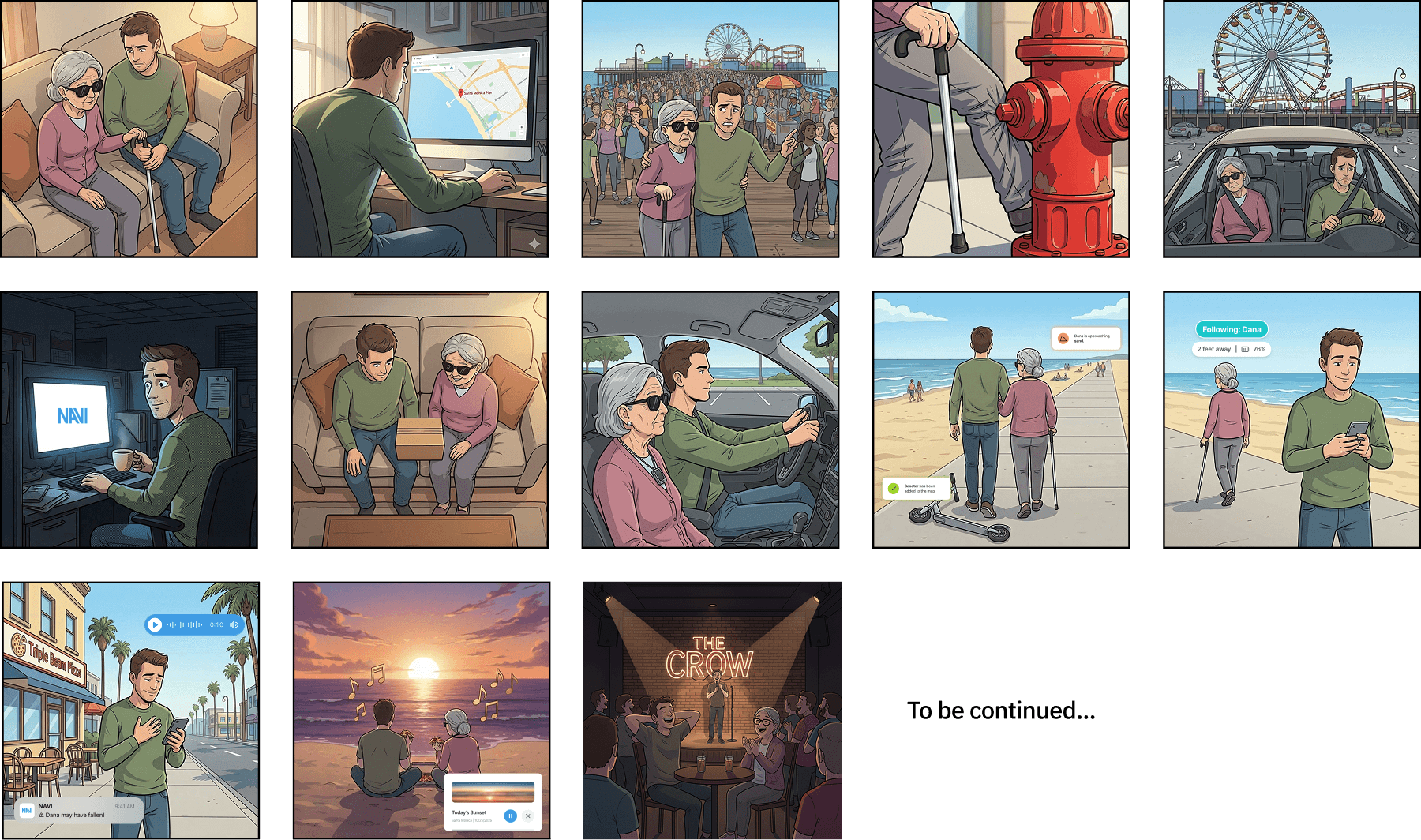
Full storyboard overview. Generated by Google Gemini, prompted by Sunni Monday.
Full storyboard overview. Generated by Google Gemini, prompted by Sunni Monday.
Full storyboard overview. Generated by Google Gemini, prompted by Sunni Monday.
Final Product
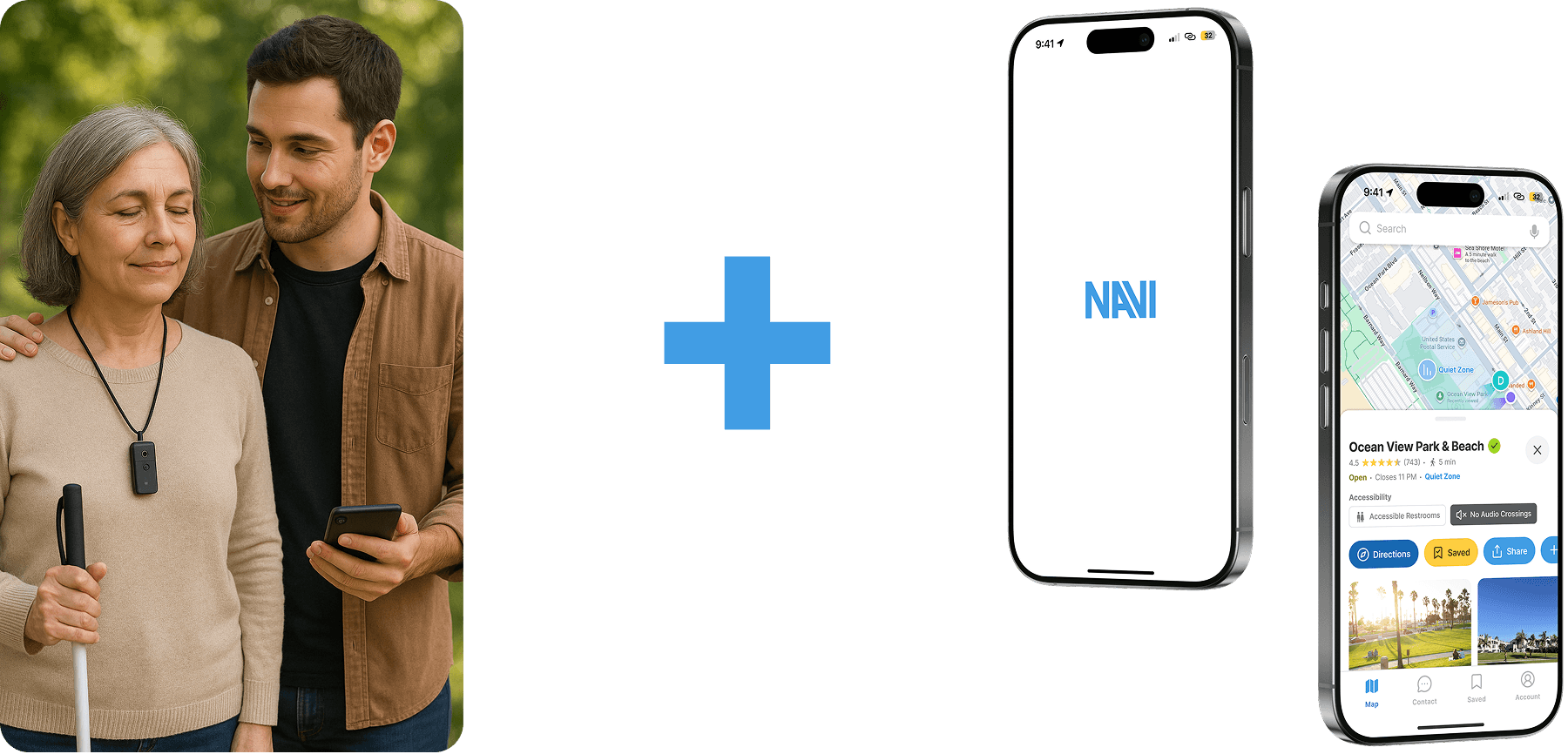
AI Navigation Wearable (VI User)
A conceptual, discreet wearable that acts as a personal sighted guide, using cameras, sensors, and near-future LIDAR to detect obstacles, crossings, and hazards. It delivers real-time audio and haptic guidance through the device or paired wearables, enabling safer, more independent navigation without drawing attention.
Caretaker Companion App
A mobile app designed to support the full caregiving journey, from planning routes to monitoring progress and responding to alerts in real time. It allows caretakers to preview community-vetted trips, track the VI user, communicate instantly, and step away briefly while staying confidently connected.
Map View & Activities
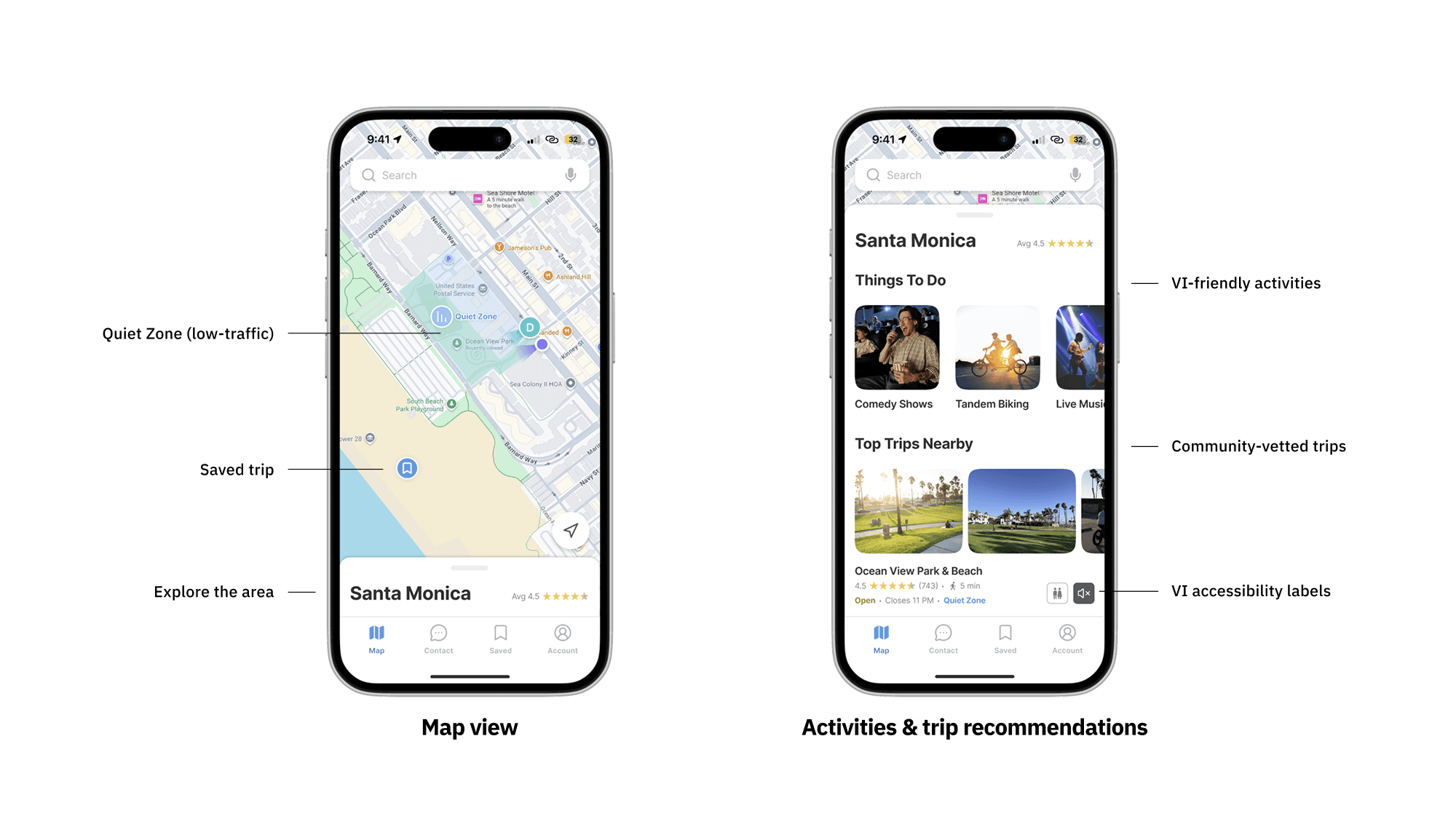
The main map shows both the caretaker and VI user, highlighting quiet zones for low-traffic areas, saved trips, and recommended VI-friendly activities. Caretakers can explore community-vetted trips with accessibility labels and click to view more details.
Trip Details & Preview
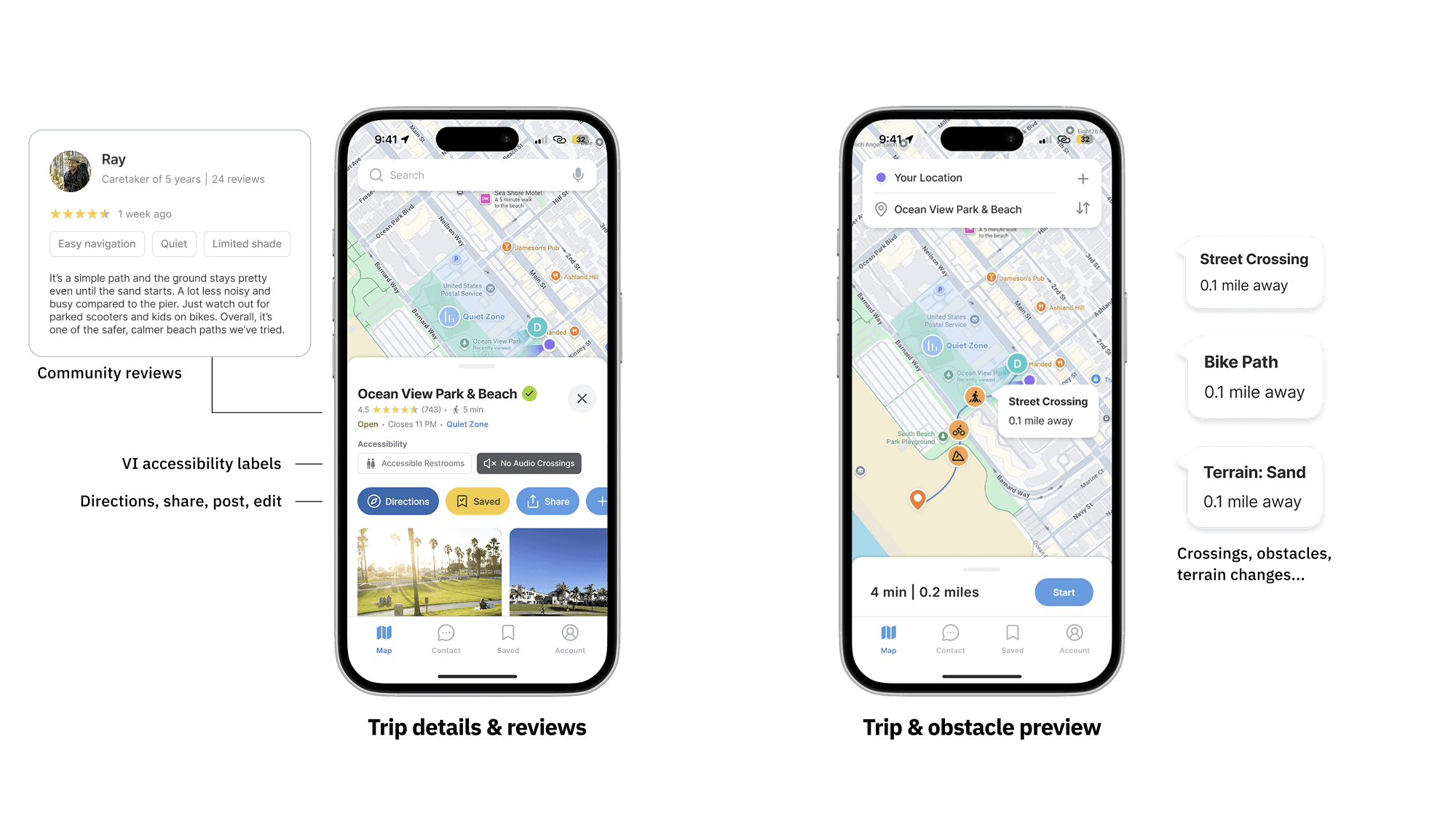
Clicking a trip displays reviews from other caretakers and VI users, expanded accessibility labels, and options like directions, sharing, or reporting. The route preview shows crossings, bike paths, terrain changes, and known obstacles, giving caretakers an overview before starting navigation.
Obstacle Alerts
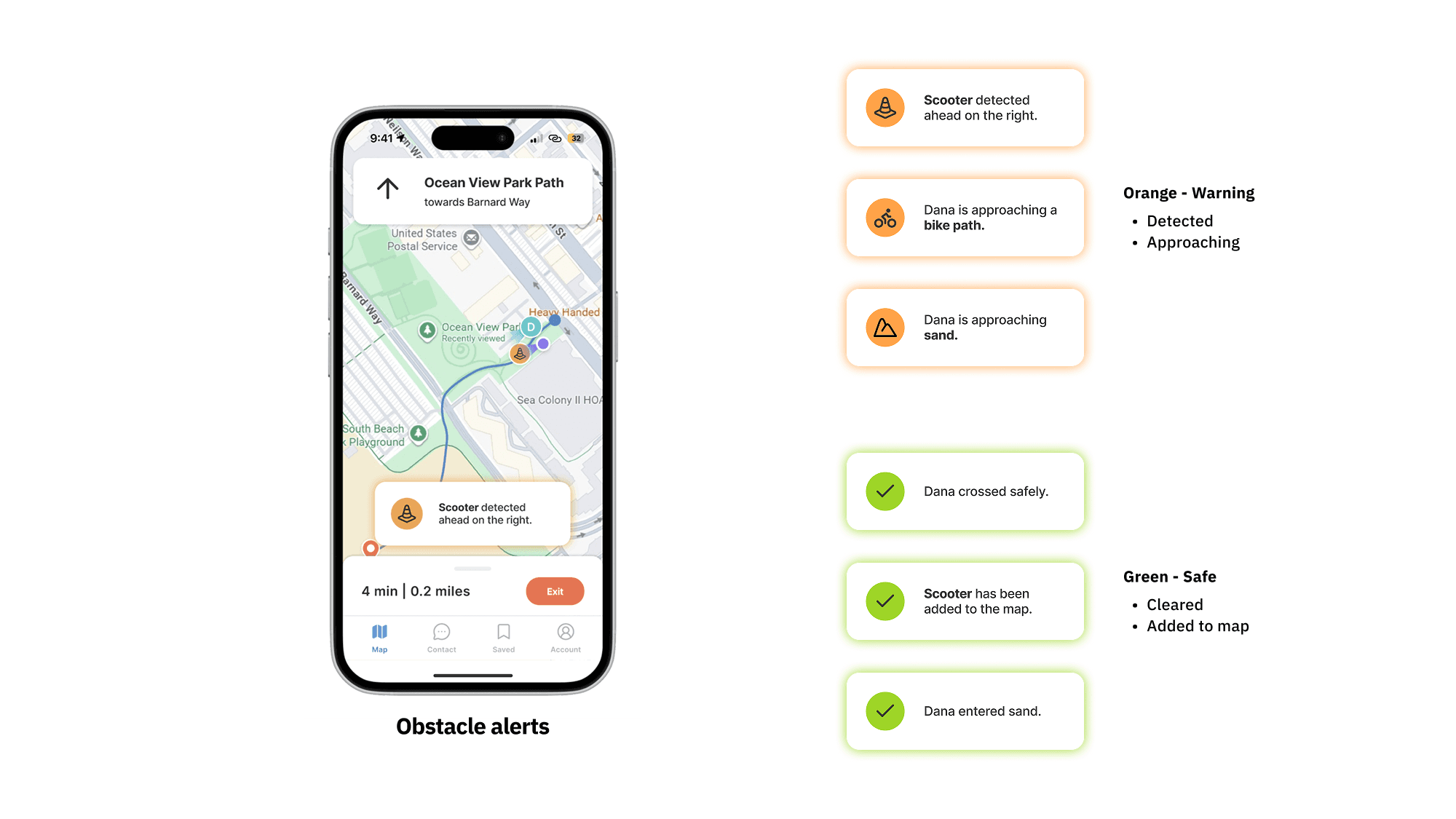
During navigation, the app notifies the caretaker of upcoming obstacles and hazards newly detected by the NAVI wearable via color-coded alerts: orange for obstacles and crossings, green when safely passed or added to the map for others. The VI user receives synchronized audio alerts through the wearable.
Communication & Tracking
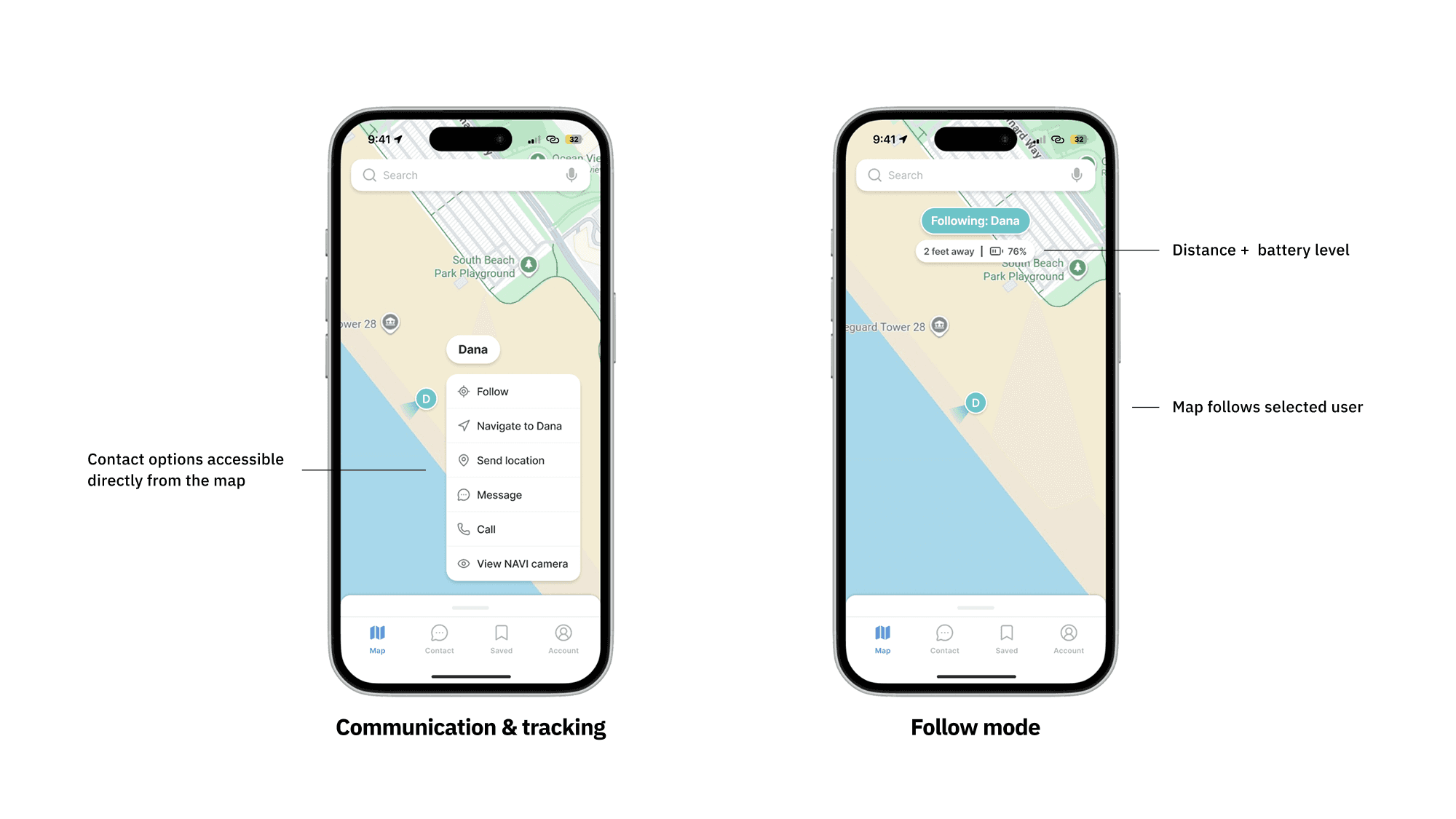
Caretakers can contact or track the VI user directly: follow them on the map, navigate to their location, send messages, call, or view the wearable’s camera. Follow mode keeps the VI user centered on the map, providing real-time tracking even when apart.
Contact & Messages
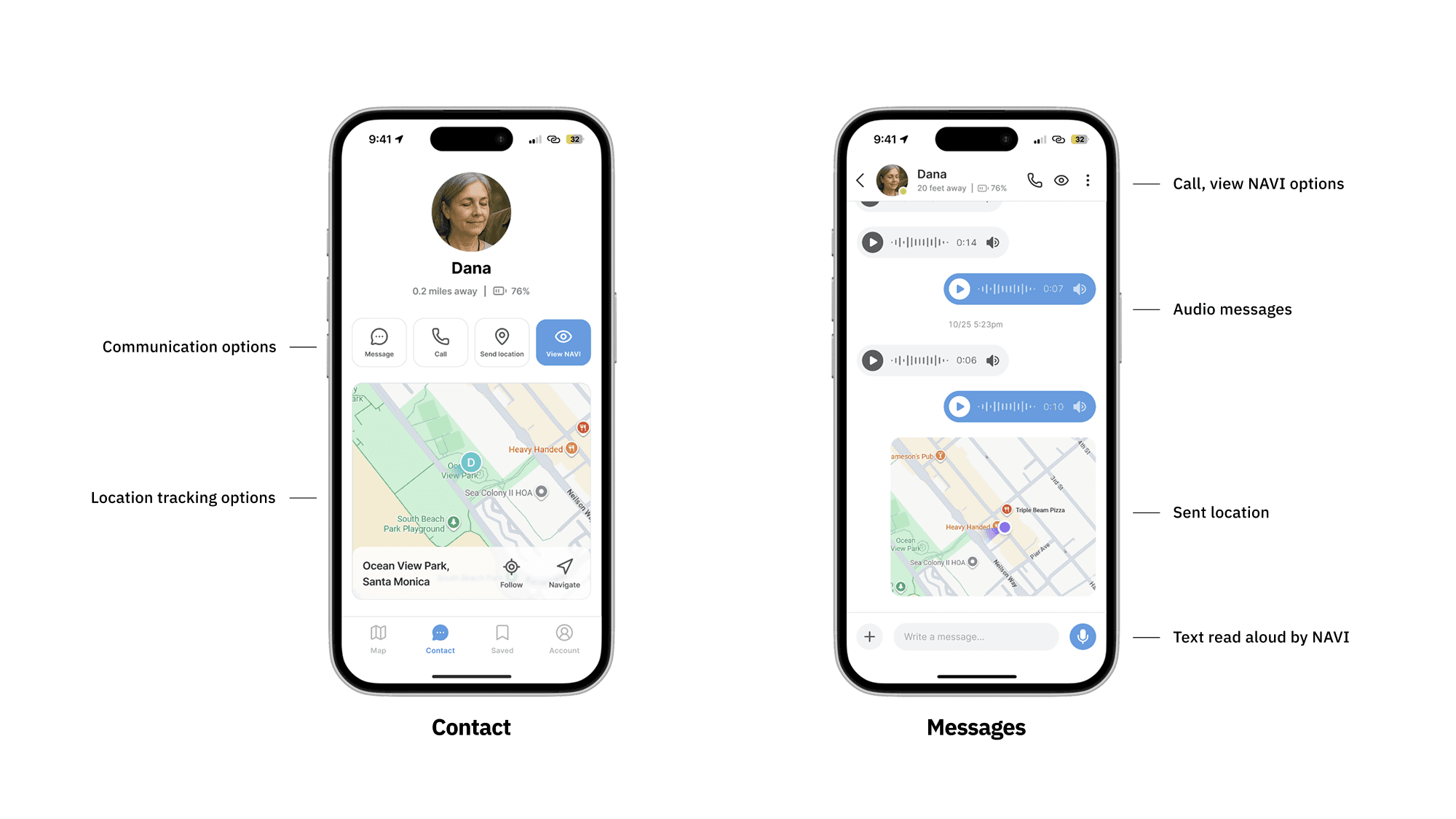
All communication and tracking features are available in the contact tab, with both audio and text messages played through the NAVI wearable.
NAVI Camera View / Emergency Alerts
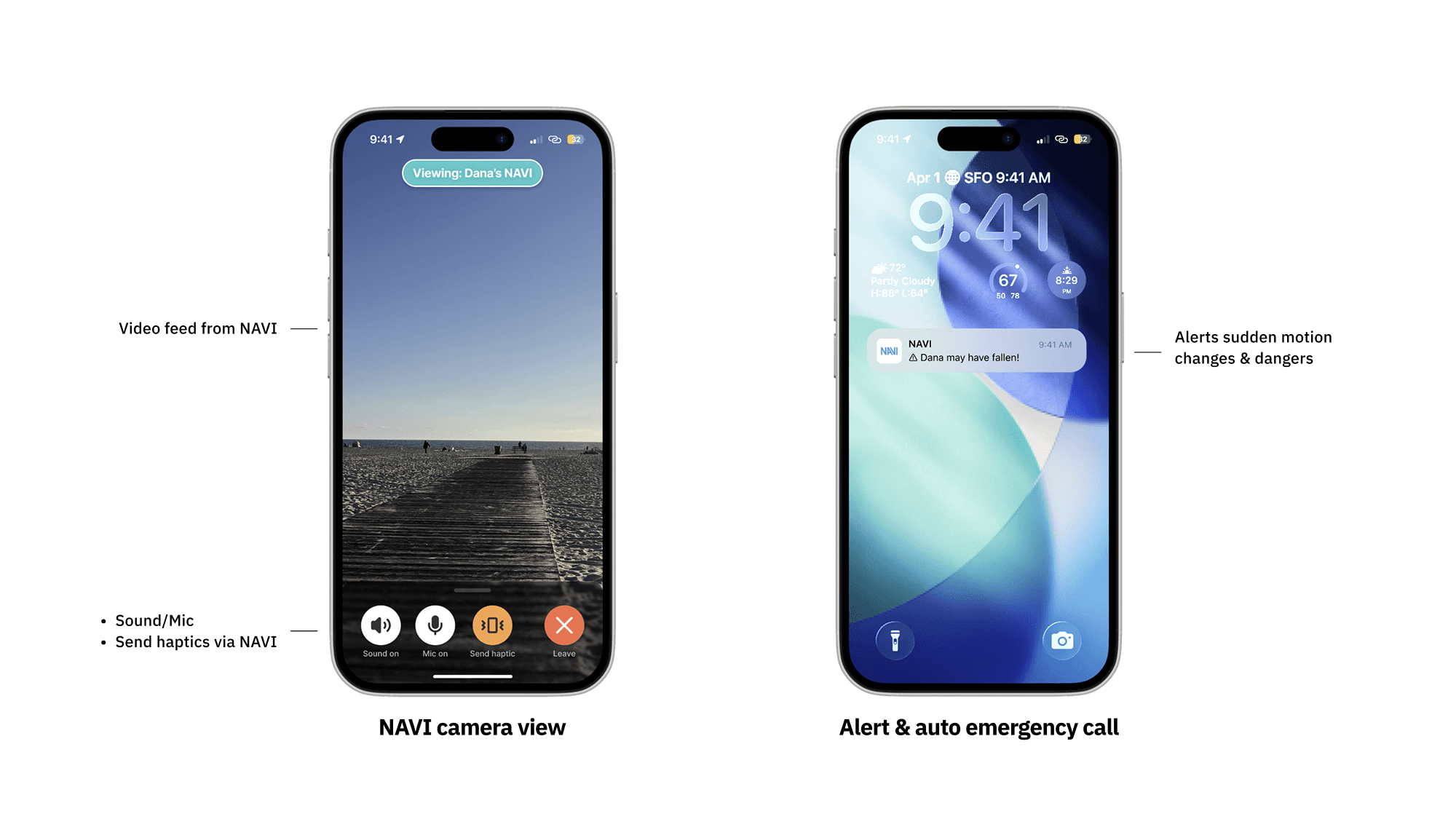
Live video from the wearable allows caretakers to check on the VI user’s environment. Caretakers can listen, speak through the device, or send gentle haptic cues for attention. The wearable detects sudden motion changes or hazards and sends alerts to the caretaker. If the VI user doesn’t respond, the device automatically calls the caretaker. Situations can also be monitored via the NAVI camera feed.
Music Experience / Saved Trip Lists
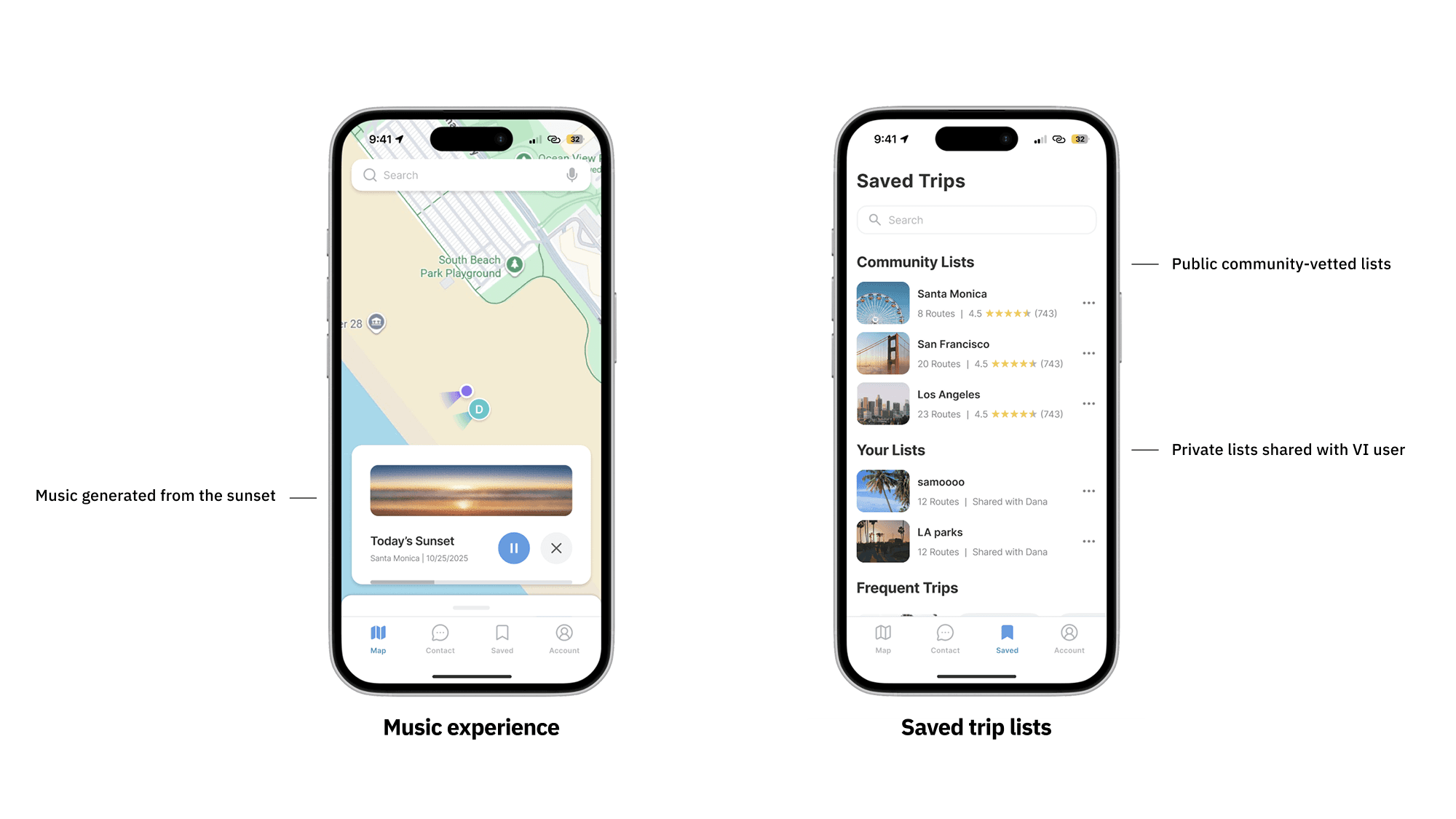
The app enhances experiences for VI users through AI-generated music based on environmental cues, like sunset colors and brightness. VI users can also request audio descriptions, creating a richer, more immersive experience. Caretakers can access saved trips in a dedicated tab, with both public community-vetted and private lists shared with the VI user. This allows easy repetition of trusted routes and supports independent exploration by the VI user.
Map View & Activities
The main map shows both the caretaker and VI user, highlighting quiet zones for low-traffic areas, saved trips, and recommended VI-friendly activities. Caretakers can explore community-vetted trips with accessibility labels and click to view more details.
Trip Details & Preview
Clicking a trip displays reviews from other caretakers and VI users, expanded accessibility labels, and options like directions, sharing, or reporting. The route preview shows crossings, bike paths, terrain changes, and known obstacles, giving caretakers an overview before starting navigation.
Obstacle Alerts
During navigation, the app notifies the caretaker of upcoming obstacles and hazards newly detected by the NAVI wearable via color-coded alerts: orange for obstacles and crossings, green when safely passed or added to the map for others. The VI user receives synchronized audio alerts through the wearable.
Communication & Tracking
Caretakers can contact or track the VI user directly: follow them on the map, navigate to their location, send messages, call, or view the wearable’s camera. Follow mode keeps the VI user centered on the map, providing real-time tracking even when apart.
Contact & Messages
All communication and tracking features are available in the contact tab, with both audio and text messages played through the NAVI wearable.
NAVI Camera View / Emergency Alerts
Live video from the wearable allows caretakers to check on the VI user’s environment. Caretakers can listen, speak through the device, or send gentle haptic cues for attention. The wearable detects sudden motion changes or hazards and sends alerts to the caretaker. If the VI user doesn’t respond, the device automatically calls the caretaker. Situations can also be monitored via the NAVI camera feed.
Music Experience / Saved Trip Lists
The app enhances experiences for VI users through AI-generated music based on environmental cues, like sunset colors and brightness. VI users can also request audio descriptions, creating a richer, more immersive experience. Caretakers can access saved trips in a dedicated tab, with both public community-vetted and private lists shared with the VI user. This allows easy repetition of trusted routes and supports independent exploration by the VI user.
Map View & Activities
The main map shows both the caretaker and VI user, highlighting quiet zones for low-traffic areas, saved trips, and recommended VI-friendly activities. Caretakers can explore community-vetted trips with accessibility labels and click to view more details.
Trip Details & Preview
Clicking a trip displays reviews from other caretakers and VI users, expanded accessibility labels, and options like directions, sharing, or reporting. The route preview shows crossings, bike paths, terrain changes, and known obstacles, giving caretakers an overview before starting navigation.
Obstacle Alerts
During navigation, the app notifies the caretaker of upcoming obstacles and hazards newly detected by the NAVI wearable via color-coded alerts: orange for obstacles and crossings, green when safely passed or added to the map for others. The VI user receives synchronized audio alerts through the wearable.
Communication & Tracking
Caretakers can contact or track the VI user directly: follow them on the map, navigate to their location, send messages, call, or view the wearable’s camera. Follow mode keeps the VI user centered on the map, providing real-time tracking even when apart.
Contact & Messages
All communication and tracking features are available in the contact tab, with both audio and text messages played through the NAVI wearable.
NAVI Camera View / Emergency Alerts
Live video from the wearable allows caretakers to check on the VI user’s environment. Caretakers can listen, speak through the device, or send gentle haptic cues for attention. The wearable detects sudden motion changes or hazards and sends alerts to the caretaker. If the VI user doesn’t respond, the device automatically calls the caretaker. Situations can also be monitored via the NAVI camera feed.
Music Experience / Saved Trip Lists
The app enhances experiences for VI users through AI-generated music based on environmental cues, like sunset colors and brightness. VI users can also request audio descriptions, creating a richer, more immersive experience. Caretakers can access saved trips in a dedicated tab, with both public community-vetted and private lists shared with the VI user. This allows easy repetition of trusted routes and supports independent exploration by the VI user.
Map View & Activities
The main map shows both the caretaker and VI user, highlighting quiet zones for low-traffic areas, saved trips, and recommended VI-friendly activities. Caretakers can explore community-vetted trips with accessibility labels and click to view more details.
Trip Details & Preview
Clicking a trip displays reviews from other caretakers and VI users, expanded accessibility labels, and options like directions, sharing, or reporting. The route preview shows crossings, bike paths, terrain changes, and known obstacles, giving caretakers an overview before starting navigation.
Obstacle Alerts
During navigation, the app notifies the caretaker of upcoming obstacles and hazards newly detected by the NAVI wearable via color-coded alerts: orange for obstacles and crossings, green when safely passed or added to the map for others. The VI user receives synchronized audio alerts through the wearable.
Communication & Tracking
Caretakers can contact or track the VI user directly: follow them on the map, navigate to their location, send messages, call, or view the wearable’s camera. Follow mode keeps the VI user centered on the map, providing real-time tracking even when apart.
Contact & Messages
All communication and tracking features are available in the contact tab, with both audio and text messages played through the NAVI wearable.
NAVI Camera View / Emergency Alerts
Live video from the wearable allows caretakers to check on the VI user’s environment. Caretakers can listen, speak through the device, or send gentle haptic cues for attention. The wearable detects sudden motion changes or hazards and sends alerts to the caretaker. If the VI user doesn’t respond, the device automatically calls the caretaker. Situations can also be monitored via the NAVI camera feed.
Music Experience / Saved Trip Lists
The app enhances experiences for VI users through AI-generated music based on environmental cues, like sunset colors and brightness. VI users can also request audio descriptions, creating a richer, more immersive experience. Caretakers can access saved trips in a dedicated tab, with both public community-vetted and private lists shared with the VI user. This allows easy repetition of trusted routes and supports independent exploration by the VI user.
Map View & Activities
The main map shows both the caretaker and VI user, highlighting quiet zones for low-traffic areas, saved trips, and recommended VI-friendly activities. Caretakers can explore community-vetted trips with accessibility labels and click to view more details.
Trip Details & Preview
Clicking a trip displays reviews from other caretakers and VI users, expanded accessibility labels, and options like directions, sharing, or reporting. The route preview shows crossings, bike paths, terrain changes, and known obstacles, giving caretakers an overview before starting navigation.
Obstacle Alerts
During navigation, the app notifies the caretaker of upcoming obstacles and hazards newly detected by the NAVI wearable via color-coded alerts: orange for obstacles and crossings, green when safely passed or added to the map for others. The VI user receives synchronized audio alerts through the wearable.
Communication & Tracking
Caretakers can contact or track the VI user directly: follow them on the map, navigate to their location, send messages, call, or view the wearable’s camera. Follow mode keeps the VI user centered on the map, providing real-time tracking even when apart.
Contact & Messages
All communication and tracking features are available in the contact tab, with both audio and text messages played through the NAVI wearable.
NAVI Camera View / Emergency Alerts
Live video from the wearable allows caretakers to check on the VI user’s environment. Caretakers can listen, speak through the device, or send gentle haptic cues for attention. The wearable detects sudden motion changes or hazards and sends alerts to the caretaker. If the VI user doesn’t respond, the device automatically calls the caretaker. Situations can also be monitored via the NAVI camera feed.
Music Experience / Saved Trip Lists
The app enhances experiences for VI users through AI-generated music based on environmental cues, like sunset colors and brightness. VI users can also request audio descriptions, creating a richer, more immersive experience. Caretakers can access saved trips in a dedicated tab, with both public community-vetted and private lists shared with the VI user. This allows easy repetition of trusted routes and supports independent exploration by the VI user.
Map View & Activities
The main map shows both the caretaker and VI user, highlighting quiet zones for low-traffic areas, saved trips, and recommended VI-friendly activities. Caretakers can explore community-vetted trips with accessibility labels and click to view more details.
Trip Details & Preview
Clicking a trip displays reviews from other caretakers and VI users, expanded accessibility labels, and options like directions, sharing, or reporting. The route preview shows crossings, bike paths, terrain changes, and known obstacles, giving caretakers an overview before starting navigation.
Obstacle Alerts
During navigation, the app notifies the caretaker of upcoming obstacles and hazards newly detected by the NAVI wearable via color-coded alerts: orange for obstacles and crossings, green when safely passed or added to the map for others. The VI user receives synchronized audio alerts through the wearable.
Communication & Tracking
Caretakers can contact or track the VI user directly: follow them on the map, navigate to their location, send messages, call, or view the wearable’s camera. Follow mode keeps the VI user centered on the map, providing real-time tracking even when apart.
Contact & Messages
All communication and tracking features are available in the contact tab, with both audio and text messages played through the NAVI wearable.
NAVI Camera View / Emergency Alerts
Live video from the wearable allows caretakers to check on the VI user’s environment. Caretakers can listen, speak through the device, or send gentle haptic cues for attention. The wearable detects sudden motion changes or hazards and sends alerts to the caretaker. If the VI user doesn’t respond, the device automatically calls the caretaker. Situations can also be monitored via the NAVI camera feed.
Music Experience / Saved Trip Lists
The app enhances experiences for VI users through AI-generated music based on environmental cues, like sunset colors and brightness. VI users can also request audio descriptions, creating a richer, more immersive experience. Caretakers can access saved trips in a dedicated tab, with both public community-vetted and private lists shared with the VI user. This allows easy repetition of trusted routes and supports independent exploration by the VI user.
Map View & Activities
The main map shows both the caretaker and VI user, highlighting quiet zones for low-traffic areas, saved trips, and recommended VI-friendly activities. Caretakers can explore community-vetted trips with accessibility labels and click to view more details.
Trip Details & Preview
Clicking a trip displays reviews from other caretakers and VI users, expanded accessibility labels, and options like directions, sharing, or reporting. The route preview shows crossings, bike paths, terrain changes, and known obstacles, giving caretakers an overview before starting navigation.
Obstacle Alerts
During navigation, the app notifies the caretaker of upcoming obstacles and hazards newly detected by the NAVI wearable via color-coded alerts: orange for obstacles and crossings, green when safely passed or added to the map for others. The VI user receives synchronized audio alerts through the wearable.
Communication & Tracking
Caretakers can contact or track the VI user directly: follow them on the map, navigate to their location, send messages, call, or view the wearable’s camera. Follow mode keeps the VI user centered on the map, providing real-time tracking even when apart.
Contact & Messages
All communication and tracking features are available in the contact tab, with both audio and text messages played through the NAVI wearable.
NAVI Camera View / Emergency Alerts
Live video from the wearable allows caretakers to check on the VI user’s environment. Caretakers can listen, speak through the device, or send gentle haptic cues for attention. The wearable detects sudden motion changes or hazards and sends alerts to the caretaker. If the VI user doesn’t respond, the device automatically calls the caretaker. Situations can also be monitored via the NAVI camera feed.
Music Experience / Saved Trip Lists
The app enhances experiences for VI users through AI-generated music based on environmental cues, like sunset colors and brightness. VI users can also request audio descriptions, creating a richer, more immersive experience. Caretakers can access saved trips in a dedicated tab, with both public community-vetted and private lists shared with the VI user. This allows easy repetition of trusted routes and supports independent exploration by the VI user.
Map View & Activities
The main map shows both the caretaker and VI user, highlighting quiet zones for low-traffic areas, saved trips, and recommended VI-friendly activities. Caretakers can explore community-vetted trips with accessibility labels and click to view more details.
Trip Details & Preview
Clicking a trip displays reviews from other caretakers and VI users, expanded accessibility labels, and options like directions, sharing, or reporting. The route preview shows crossings, bike paths, terrain changes, and known obstacles, giving caretakers an overview before starting navigation.
Obstacle Alerts
During navigation, the app notifies the caretaker of upcoming obstacles and hazards newly detected by the NAVI wearable via color-coded alerts: orange for obstacles and crossings, green when safely passed or added to the map for others. The VI user receives synchronized audio alerts through the wearable.
Communication & Tracking
Caretakers can contact or track the VI user directly: follow them on the map, navigate to their location, send messages, call, or view the wearable’s camera. Follow mode keeps the VI user centered on the map, providing real-time tracking even when apart.
Contact & Messages
All communication and tracking features are available in the contact tab, with both audio and text messages played through the NAVI wearable.
NAVI Camera View / Emergency Alerts
Live video from the wearable allows caretakers to check on the VI user’s environment. Caretakers can listen, speak through the device, or send gentle haptic cues for attention. The wearable detects sudden motion changes or hazards and sends alerts to the caretaker. If the VI user doesn’t respond, the device automatically calls the caretaker. Situations can also be monitored via the NAVI camera feed.
Music Experience / Saved Trip Lists
The app enhances experiences for VI users through AI-generated music based on environmental cues, like sunset colors and brightness. VI users can also request audio descriptions, creating a richer, more immersive experience. Caretakers can access saved trips in a dedicated tab, with both public community-vetted and private lists shared with the VI user. This allows easy repetition of trusted routes and supports independent exploration by the VI user.
Map View & Activities
The main map shows both the caretaker and VI user, highlighting quiet zones for low-traffic areas, saved trips, and recommended VI-friendly activities. Caretakers can explore community-vetted trips with accessibility labels and click to view more details.
Trip Details & Preview
Clicking a trip displays reviews from other caretakers and VI users, expanded accessibility labels, and options like directions, sharing, or reporting. The route preview shows crossings, bike paths, terrain changes, and known obstacles, giving caretakers an overview before starting navigation.
Obstacle Alerts
During navigation, the app notifies the caretaker of upcoming obstacles and hazards newly detected by the NAVI wearable via color-coded alerts: orange for obstacles and crossings, green when safely passed or added to the map for others. The VI user receives synchronized audio alerts through the wearable.
Communication & Tracking
Caretakers can contact or track the VI user directly: follow them on the map, navigate to their location, send messages, call, or view the wearable’s camera. Follow mode keeps the VI user centered on the map, providing real-time tracking even when apart.
Contact & Messages
All communication and tracking features are available in the contact tab, with both audio and text messages played through the NAVI wearable.
NAVI Camera View / Emergency Alerts
Live video from the wearable allows caretakers to check on the VI user’s environment. Caretakers can listen, speak through the device, or send gentle haptic cues for attention. The wearable detects sudden motion changes or hazards and sends alerts to the caretaker. If the VI user doesn’t respond, the device automatically calls the caretaker. Situations can also be monitored via the NAVI camera feed.
Music Experience / Saved Trip Lists
The app enhances experiences for VI users through AI-generated music based on environmental cues, like sunset colors and brightness. VI users can also request audio descriptions, creating a richer, more immersive experience. Caretakers can access saved trips in a dedicated tab, with both public community-vetted and private lists shared with the VI user. This allows easy repetition of trusted routes and supports independent exploration by the VI user.
Map View & Activities
The main map shows both the caretaker and VI user, highlighting quiet zones for low-traffic areas, saved trips, and recommended VI-friendly activities. Caretakers can explore community-vetted trips with accessibility labels and click to view more details.
Trip Details & Preview
Clicking a trip displays reviews from other caretakers and VI users, expanded accessibility labels, and options like directions, sharing, or reporting. The route preview shows crossings, bike paths, terrain changes, and known obstacles, giving caretakers an overview before starting navigation.
Obstacle Alerts
During navigation, the app notifies the caretaker of upcoming obstacles and hazards newly detected by the NAVI wearable via color-coded alerts: orange for obstacles and crossings, green when safely passed or added to the map for others. The VI user receives synchronized audio alerts through the wearable.
Communication & Tracking
Caretakers can contact or track the VI user directly: follow them on the map, navigate to their location, send messages, call, or view the wearable’s camera. Follow mode keeps the VI user centered on the map, providing real-time tracking even when apart.
Contact & Messages
All communication and tracking features are available in the contact tab, with both audio and text messages played through the NAVI wearable.
NAVI Camera View / Emergency Alerts
Live video from the wearable allows caretakers to check on the VI user’s environment. Caretakers can listen, speak through the device, or send gentle haptic cues for attention. The wearable detects sudden motion changes or hazards and sends alerts to the caretaker. If the VI user doesn’t respond, the device automatically calls the caretaker. Situations can also be monitored via the NAVI camera feed.
Music Experience / Saved Trip Lists
The app enhances experiences for VI users through AI-generated music based on environmental cues, like sunset colors and brightness. VI users can also request audio descriptions, creating a richer, more immersive experience. Caretakers can access saved trips in a dedicated tab, with both public community-vetted and private lists shared with the VI user. This allows easy repetition of trusted routes and supports independent exploration by the VI user.
Map View & Activities
The main map shows both the caretaker and VI user, highlighting quiet zones for low-traffic areas, saved trips, and recommended VI-friendly activities. Caretakers can explore community-vetted trips with accessibility labels and click to view more details.
Trip Details & Preview
Clicking a trip displays reviews from other caretakers and VI users, expanded accessibility labels, and options like directions, sharing, or reporting. The route preview shows crossings, bike paths, terrain changes, and known obstacles, giving caretakers an overview before starting navigation.
Obstacle Alerts
During navigation, the app notifies the caretaker of upcoming obstacles and hazards newly detected by the NAVI wearable via color-coded alerts: orange for obstacles and crossings, green when safely passed or added to the map for others. The VI user receives synchronized audio alerts through the wearable.
Communication & Tracking
Caretakers can contact or track the VI user directly: follow them on the map, navigate to their location, send messages, call, or view the wearable’s camera. Follow mode keeps the VI user centered on the map, providing real-time tracking even when apart.
Contact & Messages
All communication and tracking features are available in the contact tab, with both audio and text messages played through the NAVI wearable.
NAVI Camera View / Emergency Alerts
Live video from the wearable allows caretakers to check on the VI user’s environment. Caretakers can listen, speak through the device, or send gentle haptic cues for attention. The wearable detects sudden motion changes or hazards and sends alerts to the caretaker. If the VI user doesn’t respond, the device automatically calls the caretaker. Situations can also be monitored via the NAVI camera feed.
Music Experience / Saved Trip Lists
The app enhances experiences for VI users through AI-generated music based on environmental cues, like sunset colors and brightness. VI users can also request audio descriptions, creating a richer, more immersive experience. Caretakers can access saved trips in a dedicated tab, with both public community-vetted and private lists shared with the VI user. This allows easy repetition of trusted routes and supports independent exploration by the VI user.
Map View & Activities
The main map shows both the caretaker and VI user, highlighting quiet zones for low-traffic areas, saved trips, and recommended VI-friendly activities. Caretakers can explore community-vetted trips with accessibility labels and click to view more details.
Trip Details & Preview
Clicking a trip displays reviews from other caretakers and VI users, expanded accessibility labels, and options like directions, sharing, or reporting. The route preview shows crossings, bike paths, terrain changes, and known obstacles, giving caretakers an overview before starting navigation.
Obstacle Alerts
During navigation, the app notifies the caretaker of upcoming obstacles and hazards newly detected by the NAVI wearable via color-coded alerts: orange for obstacles and crossings, green when safely passed or added to the map for others. The VI user receives synchronized audio alerts through the wearable.
Communication & Tracking
Caretakers can contact or track the VI user directly: follow them on the map, navigate to their location, send messages, call, or view the wearable’s camera. Follow mode keeps the VI user centered on the map, providing real-time tracking even when apart.
Contact & Messages
All communication and tracking features are available in the contact tab, with both audio and text messages played through the NAVI wearable.
NAVI Camera View / Emergency Alerts
Live video from the wearable allows caretakers to check on the VI user’s environment. Caretakers can listen, speak through the device, or send gentle haptic cues for attention. The wearable detects sudden motion changes or hazards and sends alerts to the caretaker. If the VI user doesn’t respond, the device automatically calls the caretaker. Situations can also be monitored via the NAVI camera feed.
Music Experience / Saved Trip Lists
The app enhances experiences for VI users through AI-generated music based on environmental cues, like sunset colors and brightness. VI users can also request audio descriptions, creating a richer, more immersive experience. Caretakers can access saved trips in a dedicated tab, with both public community-vetted and private lists shared with the VI user. This allows easy repetition of trusted routes and supports independent exploration by the VI user.
Results & REflection
Results
Caregiver-focused support successfully reduces stress and builds trust in shared navigation.
Results
Caregiver-focused support successfully reduces stress and builds trust in shared navigation.
Results
Caregiver-focused support successfully reduces stress and builds trust in shared navigation.
Feedback from our final presentation at BMW Designworks highlighted that NAVI’s storytelling, research grounding, and real-world application made it feel professional, marketable, and future-ready, addressing a real need that existing AI wearables overlook. High-fidelity prototype testing with real caretakers showed that the app reduced mental load, increased confidence, and made caretakers feel seen and supported—something current assistive technologies rarely do. Caretakers expressed excitement about using NAVI in real life, valuing real-time alerts, route previews, and shared experiences that enhance both safety and meaningful independence.
“This is a real thing to pitch. Very future-looking.”
Michael De Bono
Lead Design Strategist at BMW Designworks
“This is a real thing to pitch. Very future-looking.”
Michael De Bono
Lead Design Strategist at BMW Designworks
“This is a real thing to pitch. Very future-looking.”
Michael De Bono
Lead Design Strategist at BMW Designworks
“So useful, so marketable, so necessary!”
Gillian Grebler
SMC Anthropology Professor
“So useful, so marketable, so necessary!”
Gillian Grebler
SMC Anthropology Professor
“So useful, so marketable, so necessary!”
Gillian Grebler
SMC Anthropology Professor
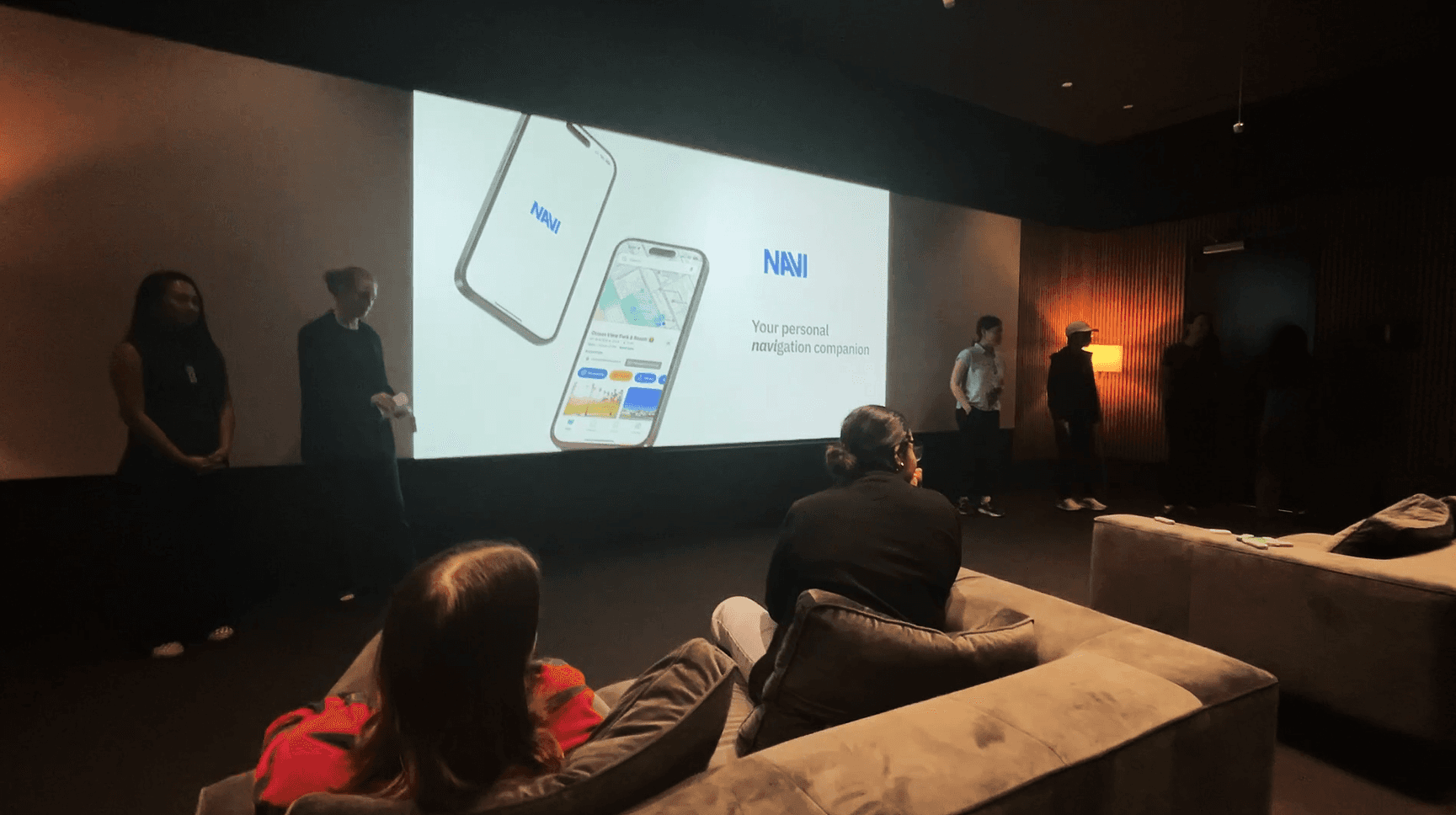
Our team presenting at BMW Designworks
Our team presenting at BMW Designworks
Our team presenting at BMW Designworks
Reflection
Shared independence, not isolated access, is the real gap in assistive technology. Effective design depends as much on narrative clarity as functionality.
Reflection
Shared independence, not isolated access, is the real gap in assistive technology. Effective design depends as much on narrative clarity as functionality.
Reflection
Shared independence, not isolated access, is the real gap in assistive technology. Effective design depends as much on narrative clarity as functionality.
I learned how without a clear story, even well-designed systems can fail to communicate their purpose or impact. Early testing showed that unclear narratives and over-complex roleplaying made it difficult for testers to understand why NAVI mattered, who it served, and how its parts worked together. This insight reshaped my prototyping approach, prioritizing focused, story-driven flows and limiting screens to only what was necessary to convey the core concept; narrowing testing to the caretaker app significantly improved comprehension and feedback. Research and validation further revealed that effective assistive technology must support shared independence, addressing caretaker reassurance, emotional load, and social inclusion—not just navigation for visually impaired users.
Next Steps
Expand NAVI into a full, integrated system.
Next Steps
Expand NAVI into a full, integrated system.
Next Steps
Expand NAVI into a full, integrated system.

Develop the AI wearable that offers audio and haptic feedback for VI users.
Develop the AI wearable that offers audio and haptic feedback for VI users.
Develop the AI wearable that offers audio and haptic feedback for VI users.

Support collaborative caregiving by connecting multiple caretakers in one platform.
Support collaborative caregiving by connecting multiple caretakers in one platform.
Support collaborative caregiving by connecting multiple caretakers in one platform.

Add Notes option for manual records and reminders to improve future trips and support the community.
Add Notes option for manual records and reminders to improve future trips and support the community.
Add Notes option for manual records and reminders to improve future trips and support the community.

Integrate app features for the VI community into existing Google Maps platform.
Integrate app features for the VI community into existing Google Maps platform.
Integrate app features for the VI community into existing Google Maps platform.